# Synology

Ein Synology NAS kann vielseitig eingesetzt werden.

# Synology Chat

Synology Chat ist die optimale Alternative zu Messengern wie WhatsApp, Telegram, Signal oder Microsoft Teams.

# Anmeldung bei Synology Chat

#### **Auf der Workstation oder dem Terminal**

- Starten Sie die Anwendung Synology Chat**[![Synology Chat Desktop Icon](https://wiki.pcspezialist-hannover.de/uploads/images/gallery/2024-05/scaled-1680-/chat-64.png)](https://wiki.pcspezialist-hannover.de/uploads/images/gallery/2024-05/chat-64.png)**
- Füllen Sie das Anmeldefenster mit den Informationen aus dem Dokument mit den Zugangsdaten aus
- [![Synology Chat Windows Anmeldung 1](https://wiki.pcspezialist-hannover.de/uploads/images/gallery/2024-05/scaled-1680-/synologychat-windows-1.png)](https://wiki.pcspezialist-hannover.de/uploads/images/gallery/2024-05/synologychat-windows-1.png)
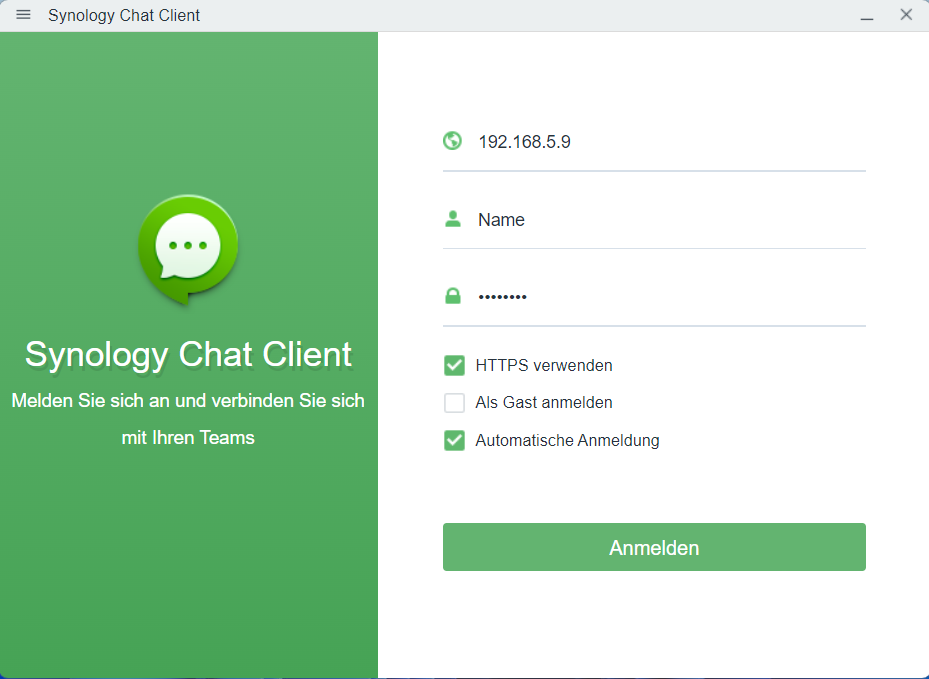
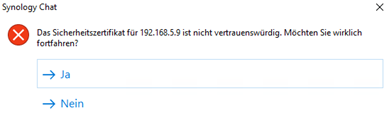
- Diese Warnung können Sie mit **Ja** ignorieren
- [![Synology Chat Windows Anmeldung 2](https://wiki.pcspezialist-hannover.de/uploads/images/gallery/2024-05/scaled-1680-/synologychat-windows-2.png)](https://wiki.pcspezialist-hannover.de/uploads/images/gallery/2024-05/synologychat-windows-2.png)
#### **Auf dem Android**

- App aus dem Google Play Store installieren: [https://play.google.com/store/apps/details?id=com.synology.dschat](https://play.google.com/store/apps/details?id=com.synology.dschat)
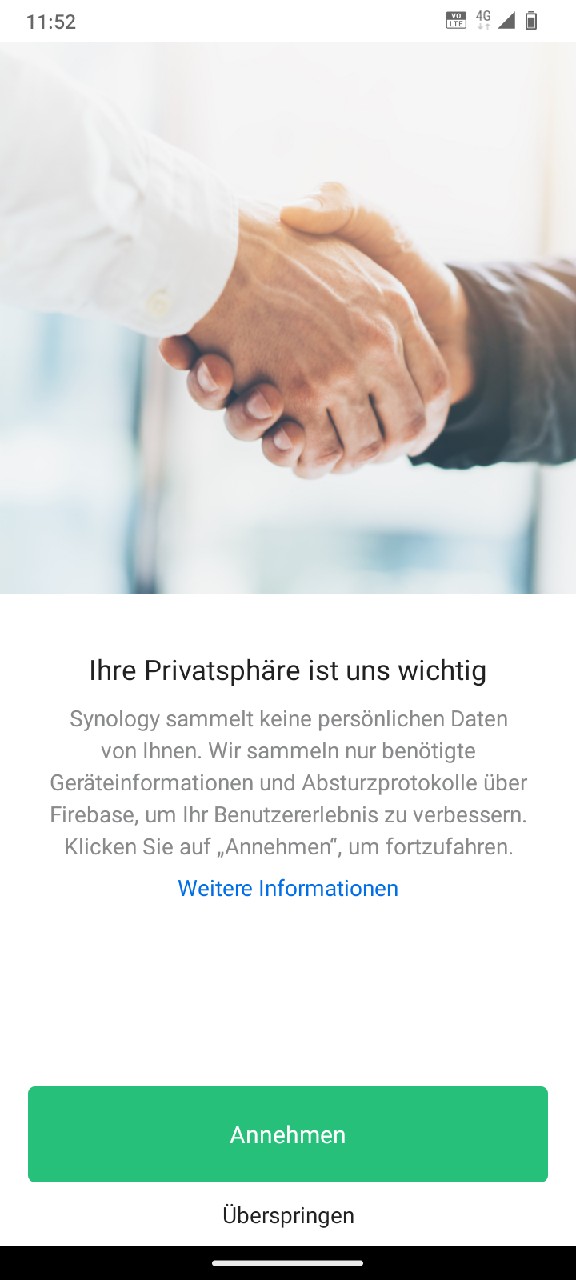
- Das Sammeln von Diagnoseprotokollen für Synology kann übersprungen werden
- [![Synology Chat Android Anmeldung 1](https://wiki.pcspezialist-hannover.de/uploads/images/gallery/2024-05/scaled-1680-/synologychat-android-1.jpg)](https://wiki.pcspezialist-hannover.de/uploads/images/gallery/2024-05/synologychat-android-1.jpg)
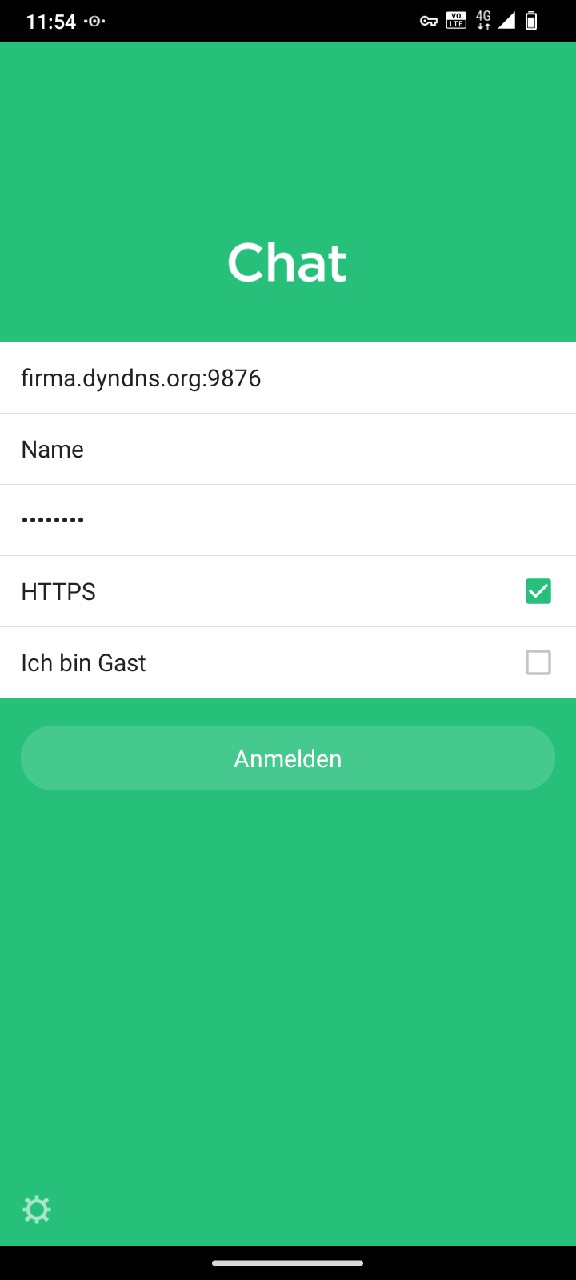
- Melden Sie sich mit den Daten aus dem Dokument mit den Zugangsdaten für die Synology Apps an[![Synology Chat Android Anmeldung 2](https://wiki.pcspezialist-hannover.de/uploads/images/gallery/2024-05/scaled-1680-/synologychat-android-2.jpg)](https://wiki.pcspezialist-hannover.de/uploads/images/gallery/2024-05/synologychat-android-2.jpg)
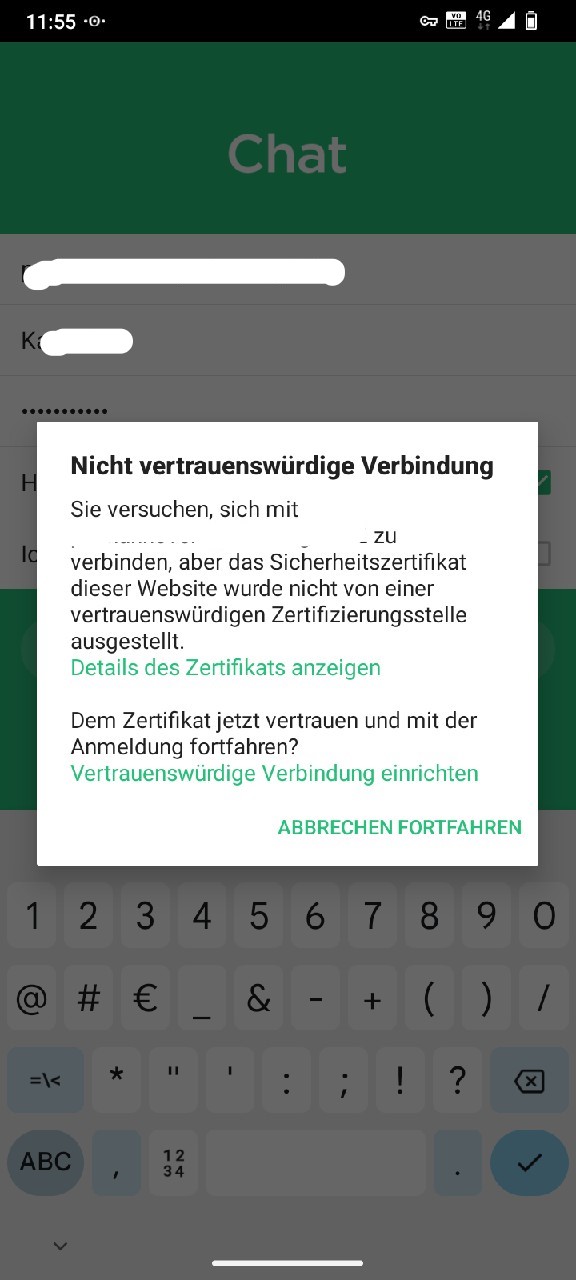
- Diese Warnung können Sie mit **Fortfahren** ignorieren
- [![Synology Chat Android Anmeldung 3](https://wiki.pcspezialist-hannover.de/uploads/images/gallery/2024-05/scaled-1680-/xUtsynologychat-android-3.jpg)](https://wiki.pcspezialist-hannover.de/uploads/images/gallery/2024-05/xUtsynologychat-android-3.jpg)
- Nun können Sie chatten
- [![Synology Chat Android Anmeldung 4](https://wiki.pcspezialist-hannover.de/uploads/images/gallery/2024-05/scaled-1680-/synologychat-android-4.jpg)](https://wiki.pcspezialist-hannover.de/uploads/images/gallery/2024-05/synologychat-android-4.jpg)
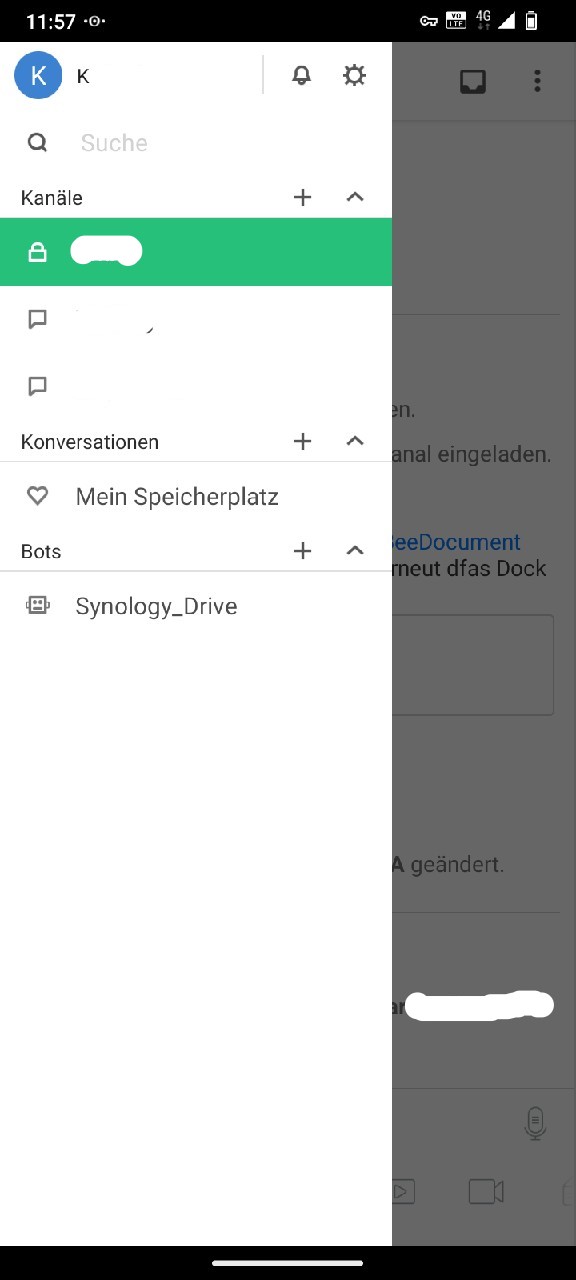
#### **Auf dem Apple**

- App aus dem App Store installieren: <span style="font-size: 11.0pt; line-height: 107%; font-family: 'Calibri',sans-serif; mso-ascii-theme-font: minor-latin; mso-fareast-font-family: Calibri; mso-fareast-theme-font: minor-latin; mso-hansi-theme-font: minor-latin; mso-bidi-font-family: 'Times New Roman'; mso-bidi-theme-font: minor-bidi; mso-ansi-language: DE; mso-fareast-language: EN-US; mso-bidi-language: AR-SA;"><span lang="EN-US" style="mso-ansi-language: EN-US;">[https://apps.apple.com/de/app/synology-chat/id1121875041](https://apps.apple.com/de/app/synology-chat/id1121875041)</span></span>
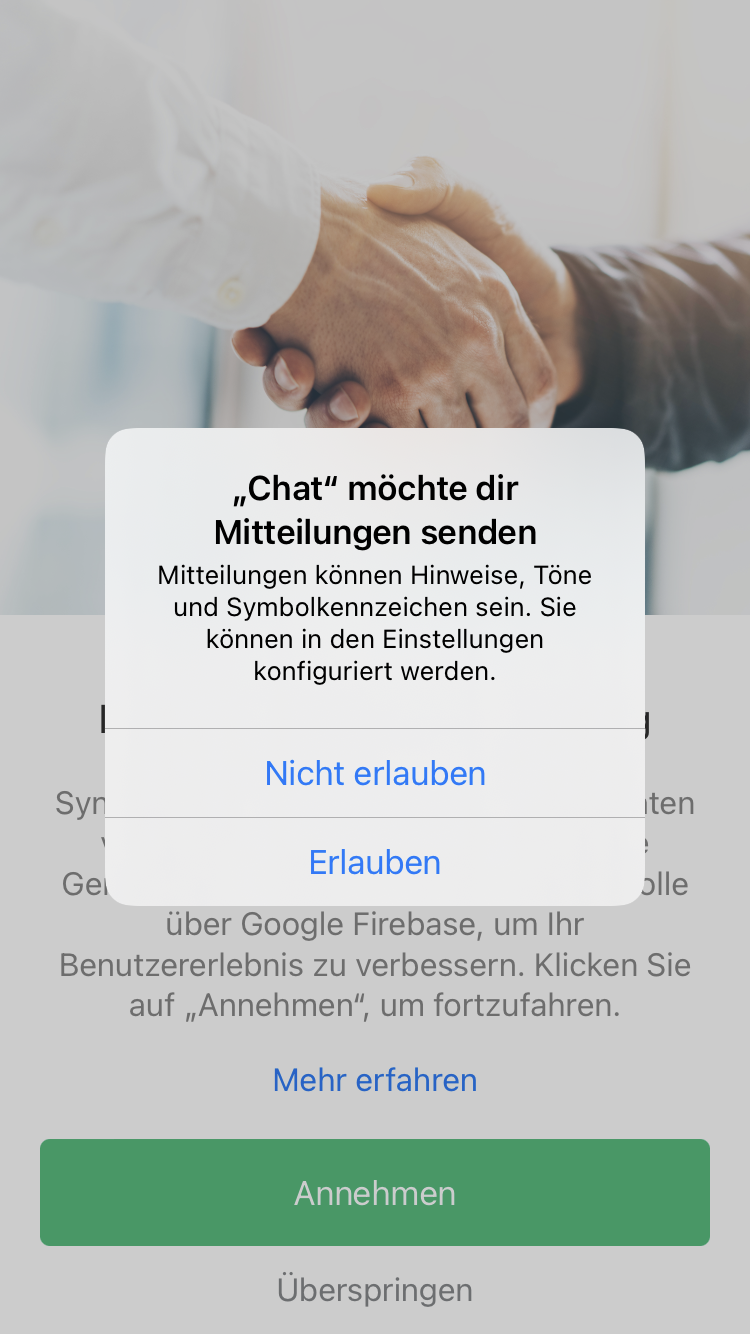
- <span style="font-size: 11.0pt; line-height: 107%; font-family: 'Calibri',sans-serif; mso-ascii-theme-font: minor-latin; mso-fareast-font-family: Calibri; mso-fareast-theme-font: minor-latin; mso-hansi-theme-font: minor-latin; mso-bidi-font-family: 'Times New Roman'; mso-bidi-theme-font: minor-bidi; mso-ansi-language: DE; mso-fareast-language: EN-US; mso-bidi-language: AR-SA;">Das Senden von Mitteilungen **Erlauben**</span>
- <span style="font-size: 11.0pt; line-height: 107%; font-family: 'Calibri',sans-serif; mso-ascii-theme-font: minor-latin; mso-fareast-font-family: Calibri; mso-fareast-theme-font: minor-latin; mso-hansi-theme-font: minor-latin; mso-bidi-font-family: 'Times New Roman'; mso-bidi-theme-font: minor-bidi; mso-ansi-language: DE; mso-fareast-language: EN-US; mso-bidi-language: AR-SA;">[![Synology Chat iOS Anmeldung 1](https://wiki.pcspezialist-hannover.de/uploads/images/gallery/2024-05/scaled-1680-/synologychat-ios-1.png)](https://wiki.pcspezialist-hannover.de/uploads/images/gallery/2024-05/synologychat-ios-1.png)</span>
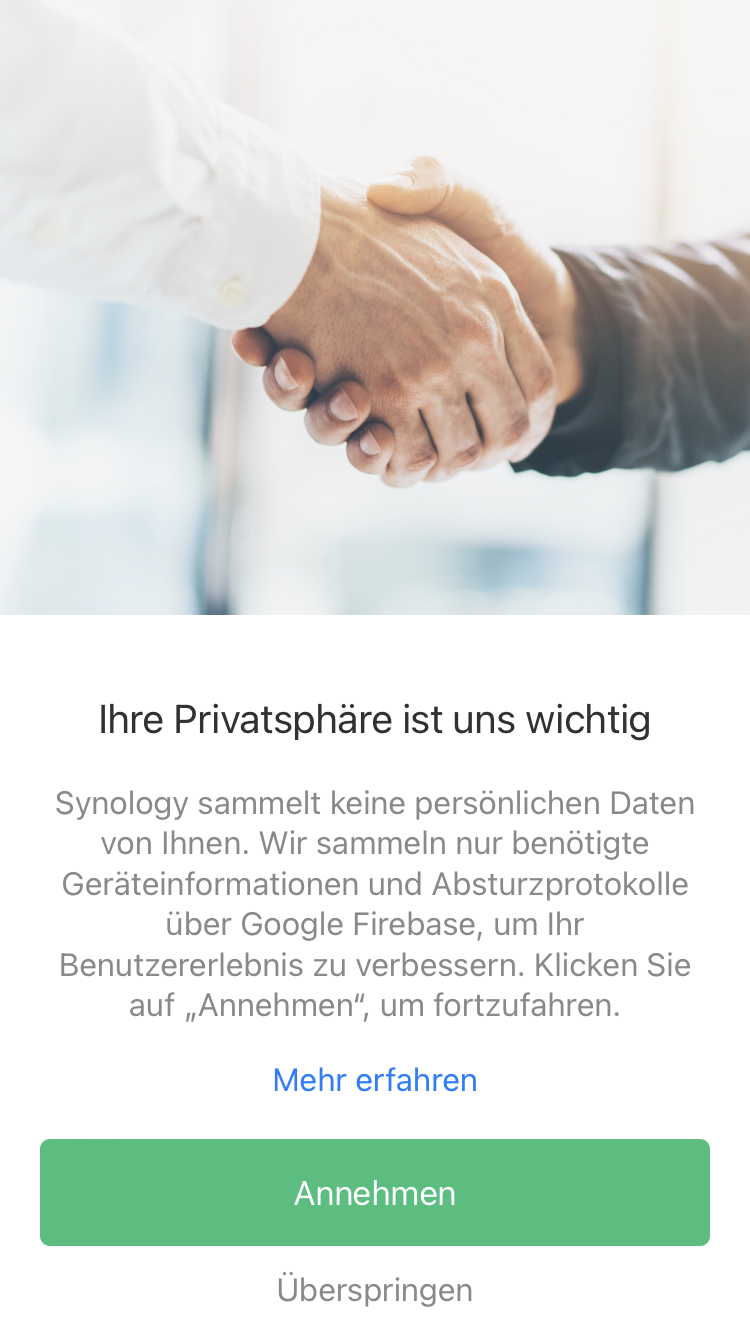
- Das Sammeln von Diagnoseprotokollen für Synology kann übersprungen werden
- [![Synology Chat iOS Anmeldung 2](https://wiki.pcspezialist-hannover.de/uploads/images/gallery/2024-05/scaled-1680-/synologychat-ios-2.png)](https://wiki.pcspezialist-hannover.de/uploads/images/gallery/2024-05/synologychat-ios-2.png)
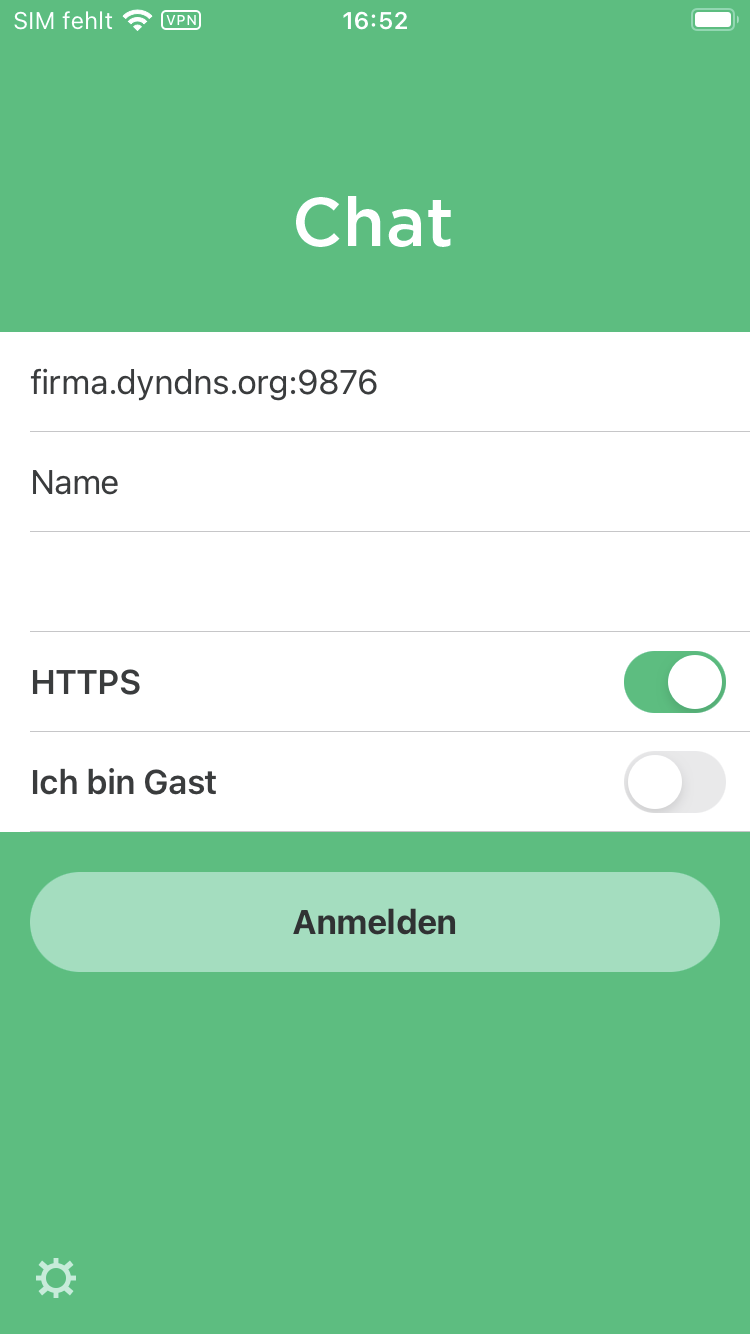
- Melden Sie sich mit den Daten aus dem Dokument mit den Zugangsdaten für die Synology Apps an
- [![Synology Chat iOS Anmeldung 3](https://wiki.pcspezialist-hannover.de/uploads/images/gallery/2024-05/scaled-1680-/synologychat-ios-3.png)](https://wiki.pcspezialist-hannover.de/uploads/images/gallery/2024-05/synologychat-ios-3.png)
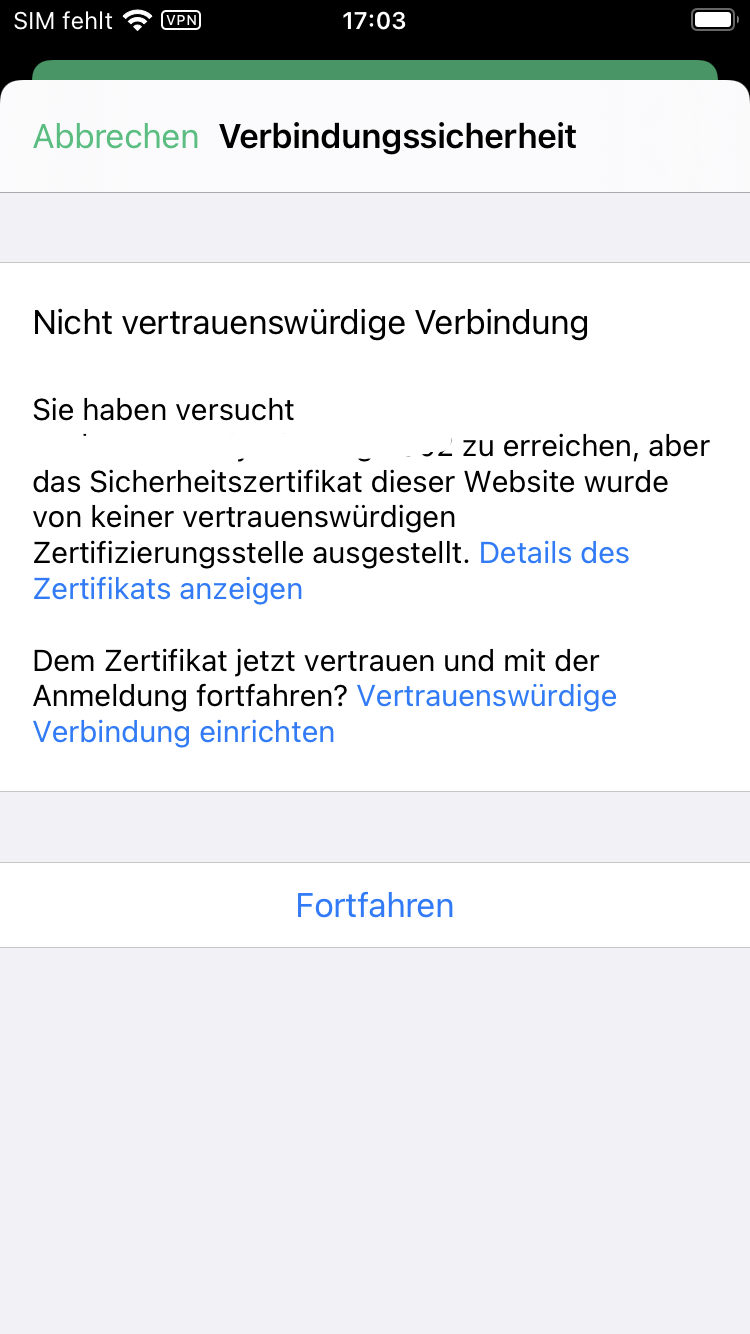
- Diese Warnung können Sie mit **Fortfahren** ignorieren
- [![Synology Chat iOS Anmeldung 4](https://wiki.pcspezialist-hannover.de/uploads/images/gallery/2024-05/scaled-1680-/synologychat-ios-4.png)](https://wiki.pcspezialist-hannover.de/uploads/images/gallery/2024-05/synologychat-ios-4.png)
- Nun können Sie chatten
- [![Synology Chat iOS Anmeldung 5](https://wiki.pcspezialist-hannover.de/uploads/images/gallery/2024-05/scaled-1680-/synologychat-ios-5.png)](https://wiki.pcspezialist-hannover.de/uploads/images/gallery/2024-05/synologychat-ios-5.png)
# Grundlegende Funktion und Tipps

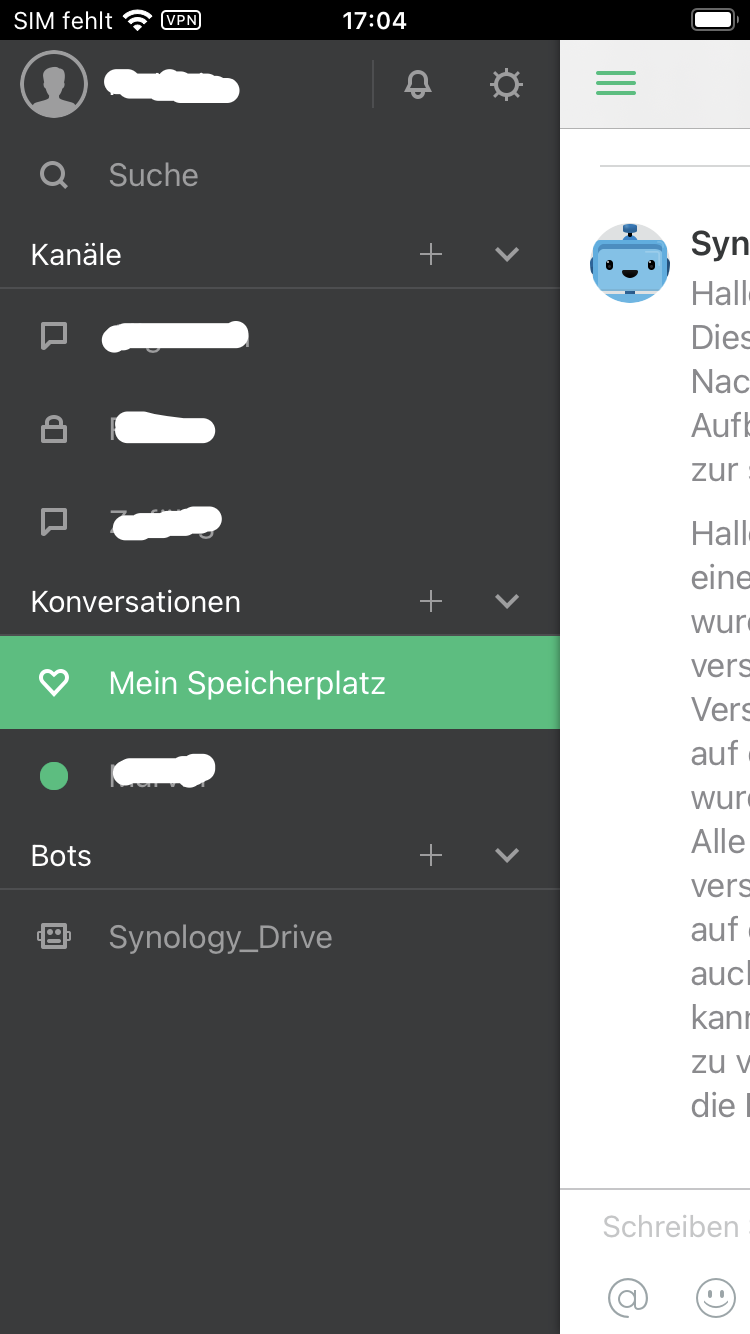
Synology Chat unterscheidet zwischen **Kanälen** und **Konversationen** Sie können Kanäle und Konversationen verschlüsseln. **<span style="color: red;">Wir raten davon</span>**<span style="color: red;"> </span>ab, da es die Nutzung im Alltag leider stark erschwert und sinnvolle Funktionen fehlen.

**Kanäle:** Sind für Personen mit gleichen Interessen, Aufgaben oder Themen gedacht.  
Zum Beispiel für Personen, die ein bestimmtes Projekt betreuen oder sich zu einem bestimmten Thema austauschen wollen.

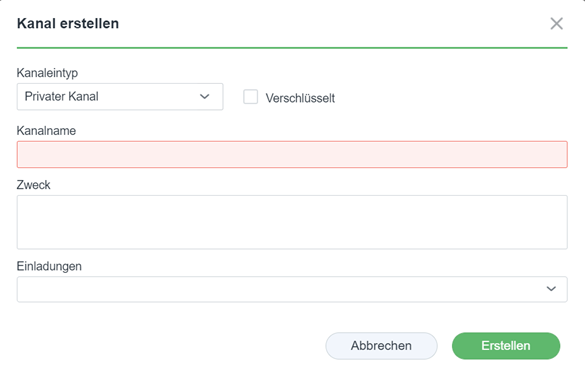
Erstellen sie einen neuen Kanal, vergeben einen eindeutigen Namen und fügen bei Bedarf eine Beschreibung hinzu<span style="mso-no-proof: yes;"></span>

[![Synology Chat Windows Kanal erstellen](https://wiki.pcspezialist-hannover.de/uploads/images/gallery/2024-05/scaled-1680-/synologychat-windows-kanal.png)](https://wiki.pcspezialist-hannover.de/uploads/images/gallery/2024-05/synologychat-windows-kanal.png)

Kanälen können beliebig viele Personen zugefügt werden.  
Mit „Einladungen“ wählen sie alle Personen aus, die in diesem Kanal dabei sein sollen.

Kanalmitglieder erkennen direkt, wenn es zu diesem spezifischen Thema etwas Neues gibt und können direkt darauf reagieren

**Konversationen:** Sind für den direkten Austausche zwischen 2 oder mehr Personen gedacht.  
Konversationen funktionieren wie ein Messenger, z.B. WhatsApp oder ähnlichem  
Sie können einer oder mehren Personen direkt Nachrichten senden und auch allen Personen direkt antworten

Starten Sie neue Konversationen und markieren alle Personen, die involviert sein sollen.  
Ähnlich dem Erstellen einer WhatsApp-Gruppe

Sie können Beiträge kommentieren, mit Emojis reagieren, Erinnerungen zufügen, Beiträge anheften, Umfragen erstellen, Dateien teilen

# Synology Chat auf aktuellem Android installieren (Version von Google Play wird nicht unterstützt)

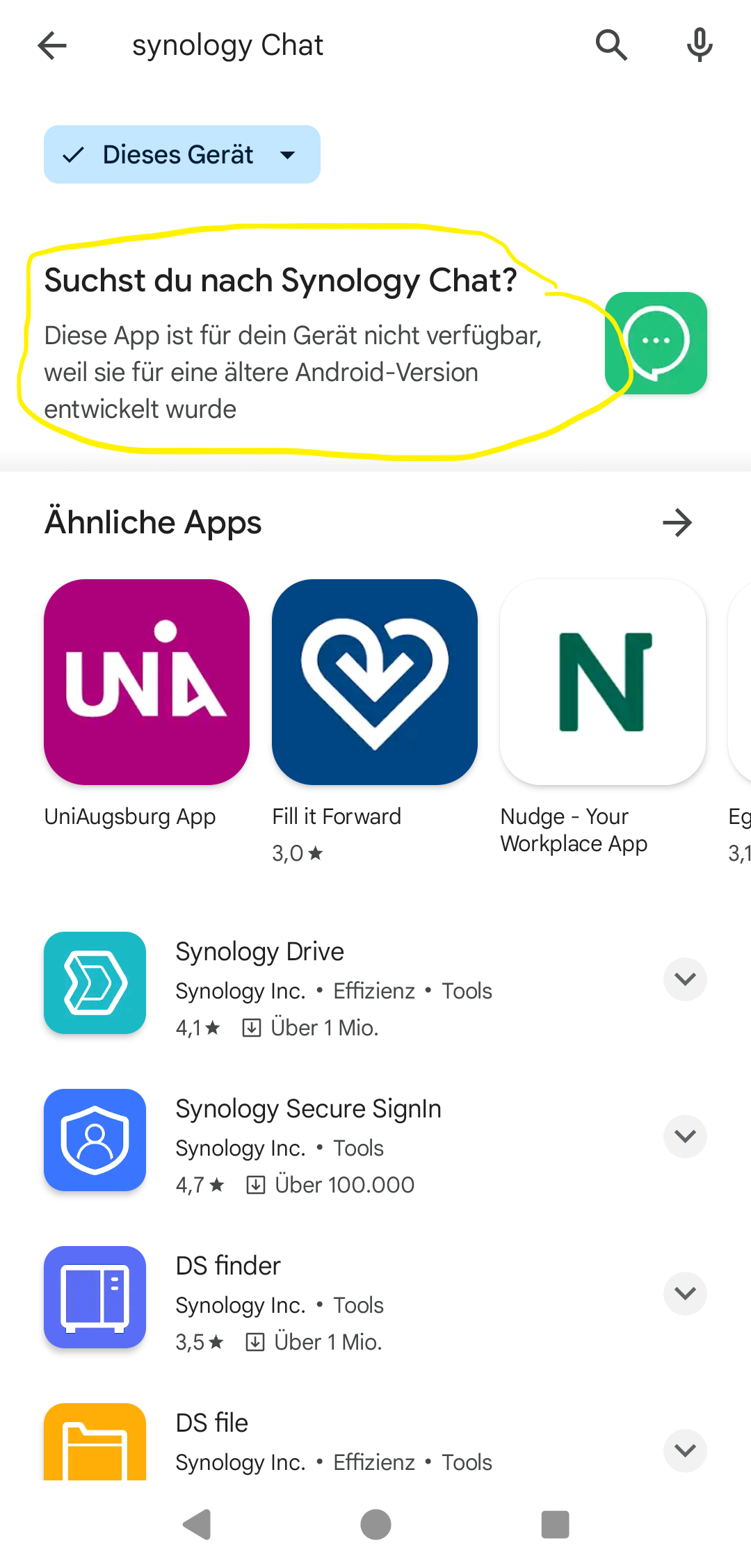
Leider hat Synology die App [Chat](https://play.google.com/store/apps/details?id=com.synology.dschat) nicht an die Sicherheitsanforderungen von aktuellen Android-Geräten angepasst.   
Deshalb ist eine "normale" Installation über Google Play leider nicht möglich.

[![Synology Chat bei Google Play](https://wiki.pcspezialist-hannover.de/uploads/images/gallery/2024-03/scaled-1680-/alt.png)](https://wiki.pcspezialist-hannover.de/uploads/images/gallery/2024-03/alt.png)
Wir und viele andere Partner haben Synology bereits mehrfach auf diesen unglücklichen Umstand [hingewiesen](https://community.synology.com/enu/forum/1/post/185366).

Da keine Abhilfe in Sicht ist, haben wir die Android-App angepasst, damit eine manuelle Installation möglich ist.

Prinzipiell raten wir von solchen "Sideloads" ab, da andere Quellen als Google Play oder F-Droid ein bisschen wie im Wilden Westen sein können - ohne Regeln und vielleicht sogar gefährlich.

<div class="text-muted break-text" id="bkmrk-angepasste-anwendung">1. [Angepasste Anwendung herunterladen](https://softwaredistributionpcs.blob.core.windows.net/synology/android/chat.apk)
2. .apk-Datei öffnen und in den Einstellungen die Installation von Anwendungen vom Browser erlauben
3. App installieren
4. App öffnen und einrichten
5. In den Einstellungen die Berechtigung des Browsers zum Installieren von Anwendungen wieder entfernen

</div>Wir können die Einrichtung auch gerne gemeinsam durchführen. Das geht per [Fernwartung](https://play.google.com/store/apps/details?id=com.anydesk.anydeskandroid), in unserer Werkstatt oder bei Ihnen vor Ort.

# Synology Drive

Synology Drive ist Ihre eigene Cloud (vergleichbar mit OneDrive, Google Drive oder Dropbox)

# Anmeldung bei Synology Drive

#### **Auf der Workstation oder dem Terminal**

- Prüfen Sie, ob Synology Drive bereits ausgeführt wird. Sie erkennen das an diesem Symbol in der Taskleiste unten rechts: 
    - Starten Sie alternativ die Anwendung Synology Drive[![Synology Drive Desktop Icon](https://wiki.pcspezialist-hannover.de/uploads/images/gallery/2024-05/scaled-1680-/drive-64.png)](https://wiki.pcspezialist-hannover.de/uploads/images/gallery/2024-05/drive-64.png)
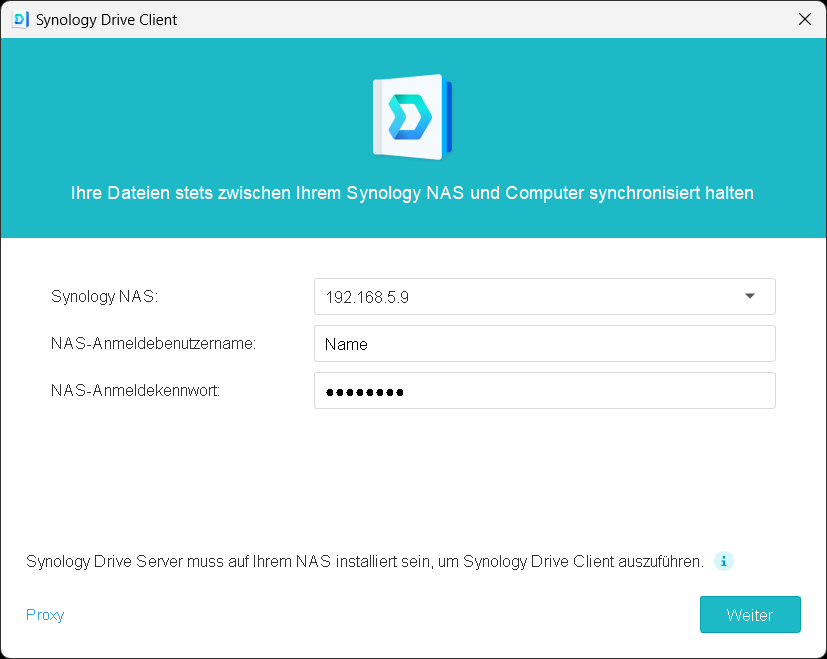
- Füllen Sie das Anmeldefenster mit den Informationen aus dem Dokument mit den Zugangsdaten aus
- [![Synology Drive Windows Anmeldung 1](https://wiki.pcspezialist-hannover.de/uploads/images/gallery/2024-05/scaled-1680-/synology-drive-anmeldung-1.png)](https://wiki.pcspezialist-hannover.de/uploads/images/gallery/2024-05/synology-drive-anmeldung-1.png)
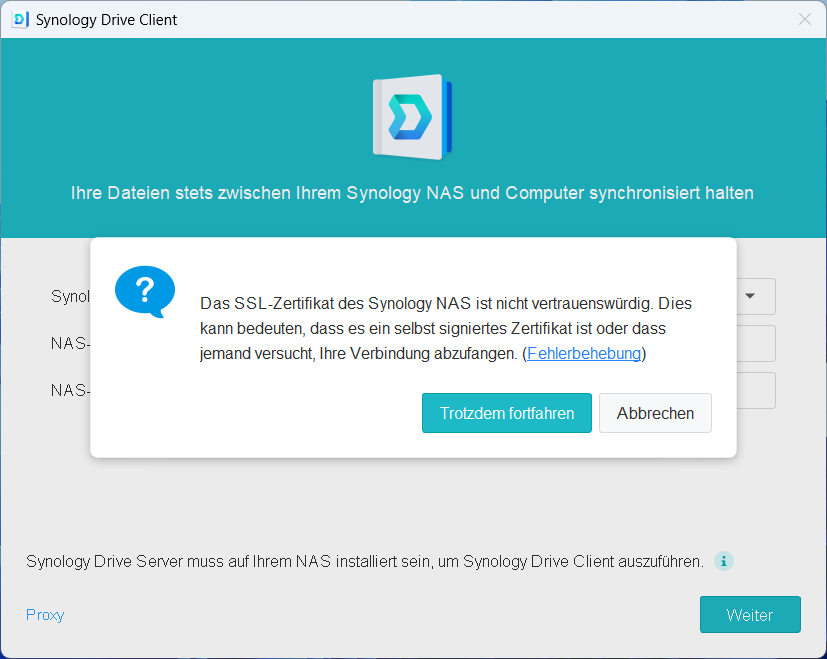
- Diese Warnung können Sie mit **Trotzdem fortfahren** ignorieren
- [![Synology Drive Windows Anmeldung 2](https://wiki.pcspezialist-hannover.de/uploads/images/gallery/2024-05/scaled-1680-/synology-drive-anmeldung-2.png)](https://wiki.pcspezialist-hannover.de/uploads/images/gallery/2024-05/synology-drive-anmeldung-2.png)
- 

#### **Auf dem Android**

- App aus dem Google Play Store installieren: [https://play.google.com/store/apps/details?id=com.synology.dsdrive](https://play.google.com/store/apps/details?id=com.synology.dsdrive)
- 

#### **Auf dem Apple**

- App aus dem App Store installieren: [https://apps.apple.com/de/app/synology-drive/id1267275421](https://apps.apple.com/de/app/synology-drive/id1267275421)
- 

# Grundlegende Funktion und Tipps

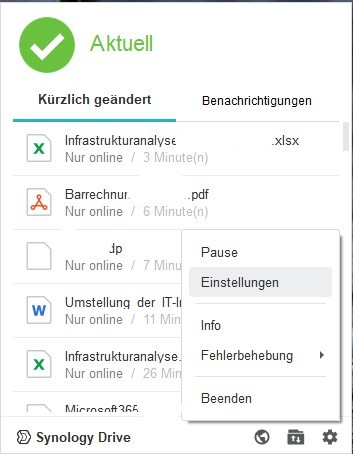
💡 Goldene Regel: Umbenennen oder Verschieben von Ordnern → warten bis das Drive-Symbol in der Taskleiste grün/„aktuell" zeigt → erst dann weiterarbeiten. Faustregel: 1 Minute pro 1 GB Ordnergröße als Wartezeit einplanen.

💡 Goldene Regel Umbenennen/Verschieben: Ordner umbenennen oder verschieben → warten bis das Drive-Symbol in der Taskleiste grün/„aktuell" zeigt → erst dann weiterarbeiten. Faustregel: 1 Minute pro 1 GB Ordnergröße als Wartezeit einplanen.

💡 Goldene Regel Gerätewechsel: Datei auf PC A fertig bearbeitet? Erst speichern, Programm vollständig schließen, Drive-Symbol grün abwarten – dann erst auf PC B öffnen. Wer das überspringt, bekommt eine Konflikt-Kopie.

💡 Goldene Regel Löschen: Eine Datei im Drive-Ordner löschen = sie verschwindet auf allen Geräten. Wer eine Datei nur lokal nicht mehr braucht: Datei aus dem Sync-Ordner herausbewegen (z. B. auf den Desktop), nicht löschen.

💡 Goldene Regel Sonderzeichen: Datei- und Ordnernamen niemals diese Zeichen enthalten: / \\ : \* ? " &lt; &gt; | – Drive synchronisiert sie dann still und heimlich nicht, ohne eine Fehlermeldung anzuzeigen.

💡 Goldene Regel Massenaktion: Viele Dateien auf einmal verschieben oder umstrukturieren? Erst Drive Client pausieren (Rechtsklick aufs Tray-Icon → Synchronisierung anhalten), dann die Aktion durchführen, dann wieder aktivieren. Spart Konflikt-Dateien und NAS-Last.

💡 Goldene Regel Sync-Ordner: Den Haupt-Sync-Ordner (SynologyDrive) auf dem PC niemals umbenennen oder verschieben – der Drive Client verliert dadurch seinen Sync-Ankerpunkt und muss komplett neu eingerichtet werden.

💡 Goldene Regel Konflikt-Dateien: Dateien mit -conflict im Namen sind keine Fehler, sondern Sicherheitskopien. Einfach beide Versionen öffnen, die richtige Fassung behalten, die andere löschen. Nie ignorieren und liegenlassen.

💡 Goldene Regel Virenschutz: Wenn Dateien manchmal nicht synchronisiert werden, ohne erkennbaren Grund: Den Drive-Sync-Ordner in die Ausnahmeliste des Antivirenprogramms aufnehmen lassen – der IT-Betreuer erledigt das einmalig.

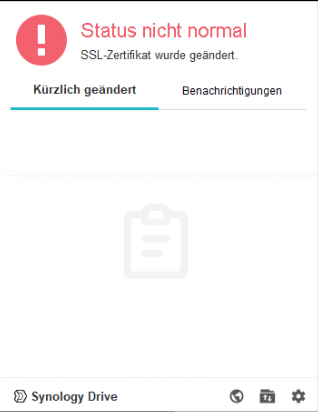
# Synology Drive Zertifikatswarnung - rotes Ausrufezeichen

<div id="bkmrk-wir-empfehlen-das-sy" style="color: #222222; font-family: Verdana, Arial, Helvetica, sans-serif; font-size: 16px; font-style: normal; font-weight: 400; letter-spacing: normal; text-indent: 0px; text-transform: none; white-space: normal; word-spacing: 0px; background-color: #ffffff; text-decoration-style: initial; text-decoration-color: initial;">Wir empfehlen das Symbol für Synology DRIVE dauerhaft sichtbar in der Taskleiste zu haben</div><div id="bkmrk-sie-finden-es-hinter" style="color: #222222; font-family: Verdana, Arial, Helvetica, sans-serif; font-size: 16px; font-style: normal; font-weight: 400; letter-spacing: normal; text-indent: 0px; text-transform: none; white-space: normal; word-spacing: 0px; background-color: #ffffff; text-decoration-style: initial; text-decoration-color: initial;">Sie finden es hinter dem [![image.png](https://wiki.pcspezialist-hannover.de/uploads/images/gallery/2024-05/scaled-1680-/image.png) ](https://wiki.pcspezialist-hannover.de/uploads/images/gallery/2024-05/image.png)</div><div id="bkmrk-ziehen-sie-das-symbo" style="color: #222222; font-family: Verdana, Arial, Helvetica, sans-serif; font-size: 16px; font-style: normal; font-weight: 400; letter-spacing: normal; text-indent: 0px; text-transform: none; white-space: normal; word-spacing: 0px; background-color: #ffffff; text-decoration-style: initial; text-decoration-color: initial;">Ziehen Sie das Symbol [![image.png](https://wiki.pcspezialist-hannover.de/uploads/images/gallery/2024-05/scaled-1680-/MM8image.png) ](https://wiki.pcspezialist-hannover.de/uploads/images/gallery/2024-05/MM8image.png)von dort in den sichtbaren Bereich neben Datum und Uhrzeit</div><div id="bkmrk-wenn-das-symbol-ein-" style="color: #222222; font-family: Verdana, Arial, Helvetica, sans-serif; font-size: 16px; font-style: normal; font-weight: 400; letter-spacing: normal; text-indent: 0px; text-transform: none; white-space: normal; word-spacing: 0px; background-color: #ffffff; text-decoration-style: initial; text-decoration-color: initial;">Wenn das Symbol ein rotes Ausrufezeichen [![Synology_Drive_rotes_Ausrufezeichen.jpg](https://wiki.pcspezialist-hannover.de/uploads/images/gallery/2026-03/scaled-1680-/synology-drive-rotes-ausrufezeichen.jpg)](https://wiki.pcspezialist-hannover.de/uploads/images/gallery/2026-03/synology-drive-rotes-ausrufezeichen.jpg) hat, ist in der Regel das ausgestellte SSL-Zertifikat erneuert worden und muss bestätigt werden</div><div id="bkmrk-dieses-zertifikat-wi" style="color: #222222; font-family: Verdana, Arial, Helvetica, sans-serif; font-size: 16px; font-style: normal; font-weight: 400; letter-spacing: normal; text-indent: 0px; text-transform: none; white-space: normal; word-spacing: 0px; background-color: #ffffff; text-decoration-style: initial; text-decoration-color: initial;">Dieses Zertifikat wird meistens alle 90 oder 365 Tage automatisch erneuert</div><div id="bkmrk-" style="color: #222222; font-family: Verdana, Arial, Helvetica, sans-serif; font-size: 16px; font-style: normal; font-weight: 400; letter-spacing: normal; text-indent: 0px; text-transform: none; white-space: normal; word-spacing: 0px; background-color: #ffffff; text-decoration-style: initial; text-decoration-color: initial;"></div><div id="bkmrk-es-gibt-2-optionen%2C-" style="color: #222222; font-family: Verdana, Arial, Helvetica, sans-serif; font-size: 16px; font-style: normal; font-weight: 400; letter-spacing: normal; text-indent: 0px; text-transform: none; white-space: normal; word-spacing: 0px; background-color: #ffffff; text-decoration-style: initial; text-decoration-color: initial;">Es gibt 2 Optionen, wie Sie damit umgehen können:</div><div id="bkmrk-1.%29-alle-90-tage-das" style="color: #222222; font-family: Verdana, Arial, Helvetica, sans-serif; font-size: 16px; font-style: normal; font-weight: 400; letter-spacing: normal; text-indent: 0px; text-transform: none; white-space: normal; word-spacing: 0px; background-color: #ffffff; text-decoration-style: initial; text-decoration-color: initial;">1.) Alle 90 bzw. 365 Tage das veränderte Zertifikat bestätigen - sicherste Variante, bedarf Ihrer Aufmerksamkeit</div><div id="bkmrk-2.%29-die-verschl%C3%BCssel" style="color: #222222; font-family: Verdana, Arial, Helvetica, sans-serif; font-size: 16px; font-style: normal; font-weight: 400; letter-spacing: normal; text-indent: 0px; text-transform: none; white-space: normal; word-spacing: 0px; background-color: #ffffff; text-decoration-style: initial; text-decoration-color: initial;">2.) Die verschlüsselte Übertragung deaktivieren - weniger sicher</div><div id="bkmrk--1" style="color: #222222; font-family: Verdana, Arial, Helvetica, sans-serif; font-size: 16px; font-style: normal; font-weight: 400; letter-spacing: normal; text-indent: 0px; text-transform: none; white-space: normal; word-spacing: 0px; background-color: #ffffff; text-decoration-style: initial; text-decoration-color: initial;"></div><div id="bkmrk--2" style="color: #222222; font-family: Verdana, Arial, Helvetica, sans-serif; font-size: 16px; font-style: normal; font-weight: 400; letter-spacing: normal; text-indent: 0px; text-transform: none; white-space: normal; word-spacing: 0px; background-color: #ffffff; text-decoration-style: initial; text-decoration-color: initial;"></div><div id="bkmrk--3" style="color: #222222; font-family: Verdana, Arial, Helvetica, sans-serif; font-size: 16px; font-style: normal; font-weight: 400; letter-spacing: normal; text-indent: 0px; text-transform: none; white-space: normal; word-spacing: 0px; background-color: #ffffff; text-decoration-style: initial; text-decoration-color: initial;"></div><div id="bkmrk-option-1%3A" style="color: #222222; font-family: Verdana, Arial, Helvetica, sans-serif; font-size: 16px; font-style: normal; font-weight: 400; letter-spacing: normal; text-indent: 0px; text-transform: none; white-space: normal; word-spacing: 0px; background-color: #ffffff; text-decoration-style: initial; text-decoration-color: initial;"><span style="text-decoration: underline;">**Option 1:**</span></div><div id="bkmrk--4" style="color: #222222; font-family: Verdana, Arial, Helvetica, sans-serif; font-size: 16px; font-style: normal; font-weight: 400; letter-spacing: normal; text-indent: 0px; text-transform: none; white-space: normal; word-spacing: 0px; background-color: #ffffff; text-decoration-style: initial; text-decoration-color: initial;"></div><div id="bkmrk-hier-eine-anleitung%3A" style="color: #222222; font-family: Verdana, Arial, Helvetica, sans-serif; font-size: 16px; font-style: normal; font-weight: 400; letter-spacing: normal; text-indent: 0px; text-transform: none; white-space: normal; word-spacing: 0px; background-color: #ffffff; text-decoration-style: initial; text-decoration-color: initial;">  
</div><div id="bkmrk--5" style="color: #222222; font-family: Verdana, Arial, Helvetica, sans-serif; font-size: 16px; font-style: normal; font-weight: 400; letter-spacing: normal; text-indent: 0px; text-transform: none; white-space: normal; word-spacing: 0px; background-color: #ffffff; text-decoration-style: initial; text-decoration-color: initial;"></div><div id="bkmrk-1.-in-synology-drive" style="color: #222222; font-family: Verdana, Arial, Helvetica, sans-serif; font-size: 16px; font-style: normal; font-weight: 400; letter-spacing: normal; text-indent: 0px; text-transform: none; white-space: normal; word-spacing: 0px; background-color: #ffffff; text-decoration-style: initial; text-decoration-color: initial;">1. In Synology Drive die Einstellungen öffnen (Zahnrad-Symbol)</div><div id="bkmrk--6" style="color: #222222; font-family: Verdana, Arial, Helvetica, sans-serif; font-size: 16px; font-style: normal; font-weight: 400; letter-spacing: normal; text-indent: 0px; text-transform: none; white-space: normal; word-spacing: 0px; background-color: #ffffff; text-decoration-style: initial; text-decoration-color: initial;">  
</div><div id="bkmrk--7" style="color: #222222; font-family: Verdana, Arial, Helvetica, sans-serif; font-size: 16px; font-style: normal; font-weight: 400; letter-spacing: normal; text-indent: 0px; text-transform: none; white-space: normal; word-spacing: 0px; background-color: #ffffff; text-decoration-style: initial; text-decoration-color: initial;">![embedded-image-qlddkv1o.png](https://wiki.pcspezialist-hannover.de/uploads/images/gallery/2024-05/embedded-image-qlddkv1o.png)</div><div id="bkmrk--8" style="color: #222222; font-family: Verdana, Arial, Helvetica, sans-serif; font-size: 16px; font-style: normal; font-weight: 400; letter-spacing: normal; text-indent: 0px; text-transform: none; white-space: normal; word-spacing: 0px; background-color: #ffffff; text-decoration-style: initial; text-decoration-color: initial;">  
</div><div id="bkmrk-2.-zu-den-einstellun" style="color: #222222; font-family: Verdana, Arial, Helvetica, sans-serif; font-size: 16px; font-style: normal; font-weight: 400; letter-spacing: normal; text-indent: 0px; text-transform: none; white-space: normal; word-spacing: 0px; background-color: #ffffff; text-decoration-style: initial; text-decoration-color: initial;">2. Zu den **Einstellungen** gehen</div><div id="bkmrk--9" style="color: #222222; font-family: Verdana, Arial, Helvetica, sans-serif; font-size: 16px; font-style: normal; font-weight: 400; letter-spacing: normal; text-indent: 0px; text-transform: none; white-space: normal; word-spacing: 0px; background-color: #ffffff; text-decoration-style: initial; text-decoration-color: initial;">![embedded-image-hsdodkfr.png](https://wiki.pcspezialist-hannover.de/uploads/images/gallery/2024-05/embedded-image-hsdodkfr.png)</div><div id="bkmrk--10" style="color: #222222; font-family: Verdana, Arial, Helvetica, sans-serif; font-size: 16px; font-style: normal; font-weight: 400; letter-spacing: normal; text-indent: 0px; text-transform: none; white-space: normal; word-spacing: 0px; background-color: #ffffff; text-decoration-style: initial; text-decoration-color: initial;">  
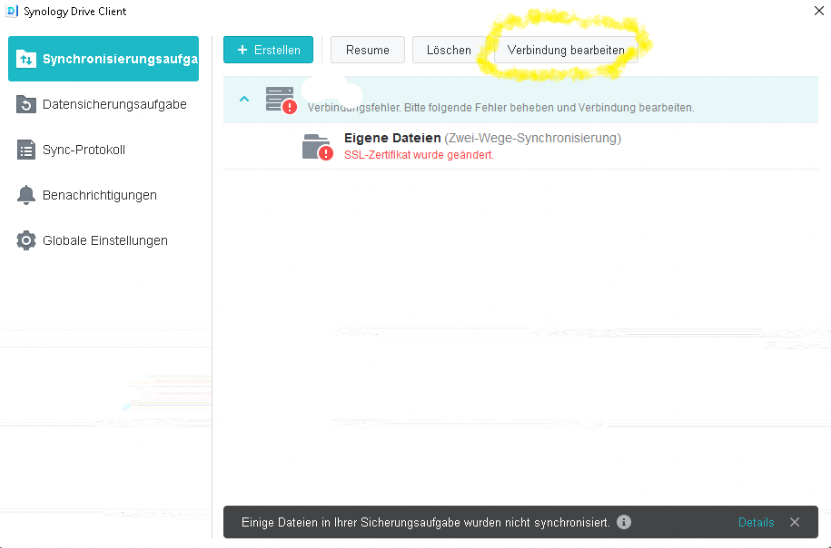
</div><div id="bkmrk-3.-verbindung-bearbe" style="color: #222222; font-family: Verdana, Arial, Helvetica, sans-serif; font-size: 16px; font-style: normal; font-weight: 400; letter-spacing: normal; text-indent: 0px; text-transform: none; white-space: normal; word-spacing: 0px; background-color: #ffffff; text-decoration-style: initial; text-decoration-color: initial;">3. **Verbindung bearbeiten** auswählen</div><div id="bkmrk--11" style="color: #222222; font-family: Verdana, Arial, Helvetica, sans-serif; font-size: 16px; font-style: normal; font-weight: 400; letter-spacing: normal; text-indent: 0px; text-transform: none; white-space: normal; word-spacing: 0px; background-color: #ffffff; text-decoration-style: initial; text-decoration-color: initial;">![embedded-image-fv3tnvk4.png](https://wiki.pcspezialist-hannover.de/uploads/images/gallery/2024-05/embedded-image-fv3tnvk4.png)</div><div id="bkmrk--12" style="color: #222222; font-family: Verdana, Arial, Helvetica, sans-serif; font-size: 16px; font-style: normal; font-weight: 400; letter-spacing: normal; text-indent: 0px; text-transform: none; white-space: normal; word-spacing: 0px; background-color: #ffffff; text-decoration-style: initial; text-decoration-color: initial;">  
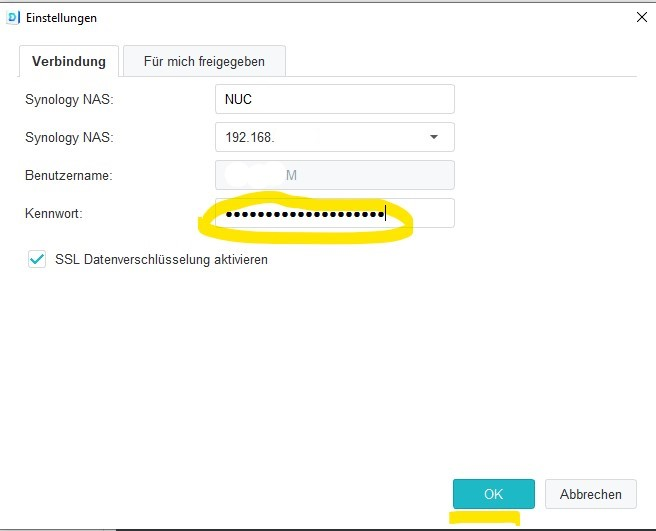
</div><div id="bkmrk-4.-das-kennwort-eing" style="color: #222222; font-family: Verdana, Arial, Helvetica, sans-serif; font-size: 16px; font-style: normal; font-weight: 400; letter-spacing: normal; text-indent: 0px; text-transform: none; white-space: normal; word-spacing: 0px; background-color: #ffffff; text-decoration-style: initial; text-decoration-color: initial;">4. Das **Kennwort** eingeben und auf **OK** klicken</div><div id="bkmrk--13" style="color: #222222; font-family: Verdana, Arial, Helvetica, sans-serif; font-size: 16px; font-style: normal; font-weight: 400; letter-spacing: normal; text-indent: 0px; text-transform: none; white-space: normal; word-spacing: 0px; background-color: #ffffff; text-decoration-style: initial; text-decoration-color: initial;">![embedded-image-iiio39bq.png](https://wiki.pcspezialist-hannover.de/uploads/images/gallery/2024-05/embedded-image-iiio39bq.png)</div><div id="bkmrk--14" style="color: #222222; font-family: Verdana, Arial, Helvetica, sans-serif; font-size: 16px; font-style: normal; font-weight: 400; letter-spacing: normal; text-indent: 0px; text-transform: none; white-space: normal; word-spacing: 0px; background-color: #ffffff; text-decoration-style: initial; text-decoration-color: initial;">  
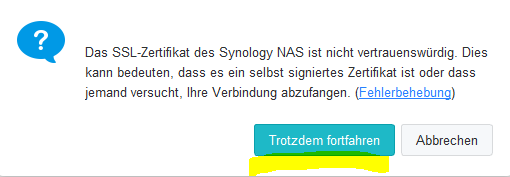
</div><div id="bkmrk-5.-trotzdem-fortfahr" style="color: #222222; font-family: Verdana, Arial, Helvetica, sans-serif; font-size: 16px; font-style: normal; font-weight: 400; letter-spacing: normal; text-indent: 0px; text-transform: none; white-space: normal; word-spacing: 0px; background-color: #ffffff; text-decoration-style: initial; text-decoration-color: initial;">5. **Trotzdem fortfahren** auswählen, da es sich um ein selbst signiertes Zertifikat handelt</div><div id="bkmrk--15" style="color: #222222; font-family: Verdana, Arial, Helvetica, sans-serif; font-size: 16px; font-style: normal; font-weight: 400; letter-spacing: normal; text-indent: 0px; text-transform: none; white-space: normal; word-spacing: 0px; background-color: #ffffff; text-decoration-style: initial; text-decoration-color: initial;">![embedded-image-verjwroy.png](https://wiki.pcspezialist-hannover.de/uploads/images/gallery/2024-05/embedded-image-verjwroy.png)</div><div id="bkmrk--16" style="color: #222222; font-family: Verdana, Arial, Helvetica, sans-serif; font-size: 16px; font-style: normal; font-weight: 400; letter-spacing: normal; text-indent: 0px; text-transform: none; white-space: normal; word-spacing: 0px; background-color: #ffffff; text-decoration-style: initial; text-decoration-color: initial;">  
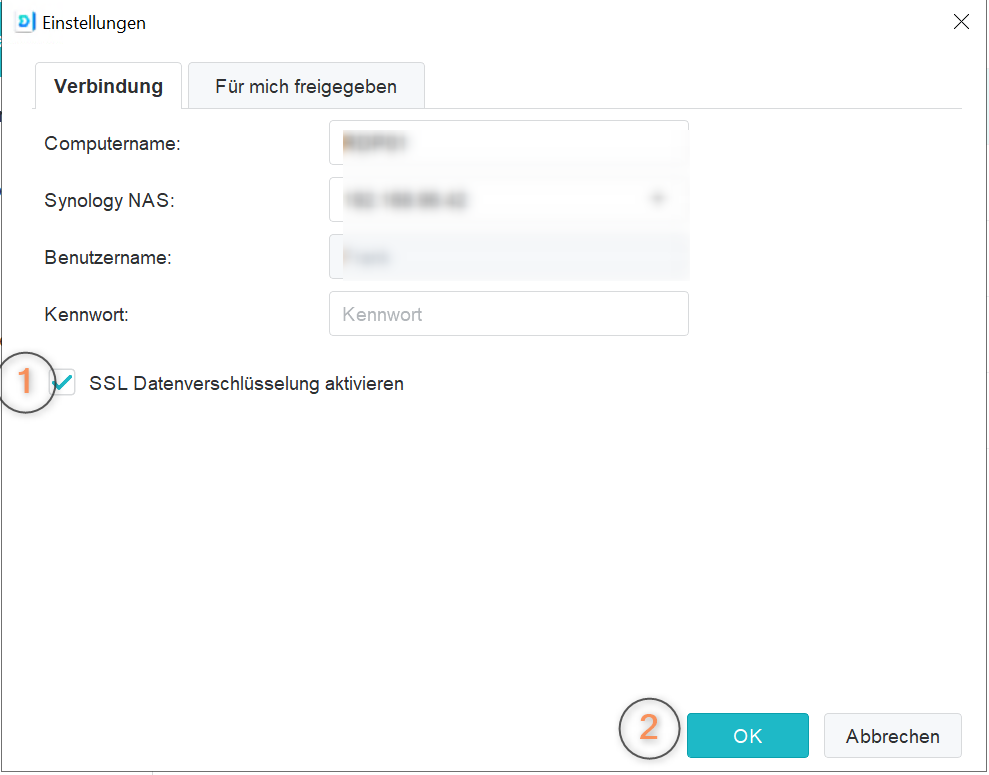
</div><div id="bkmrk-6.-die-verbindung-wi" style="color: #222222; font-family: Verdana, Arial, Helvetica, sans-serif; font-size: 16px; font-style: normal; font-weight: 400; letter-spacing: normal; text-indent: 0px; text-transform: none; white-space: normal; word-spacing: 0px; background-color: #ffffff; text-decoration-style: initial; text-decoration-color: initial;">6. Die Verbindung wird wieder aufgebaut.</div><div id="bkmrk--17" style="color: #222222; font-family: Verdana, Arial, Helvetica, sans-serif; font-size: 16px; font-style: normal; font-weight: 400; letter-spacing: normal; text-indent: 0px; text-transform: none; white-space: normal; word-spacing: 0px; background-color: #ffffff; text-decoration-style: initial; text-decoration-color: initial;"></div><div id="bkmrk-in-manchen-f%C3%A4llen-st" style="color: #222222; font-family: Verdana, Arial, Helvetica, sans-serif; font-size: 16px; font-style: normal; font-weight: 400; letter-spacing: normal; text-indent: 0px; text-transform: none; white-space: normal; word-spacing: 0px; background-color: #ffffff; text-decoration-style: initial; text-decoration-color: initial;">In manchen Fällen steht Synology DRIVE dann auf Resume [![image.png](https://wiki.pcspezialist-hannover.de/uploads/images/gallery/2024-05/scaled-1680-/kitimage.png)](https://wiki.pcspezialist-hannover.de/uploads/images/gallery/2024-05/kitimage.png)</div><div id="bkmrk-klicken-sie-auf-den-" style="color: #222222; font-family: Verdana, Arial, Helvetica, sans-serif; font-size: 16px; font-style: normal; font-weight: 400; letter-spacing: normal; text-indent: 0px; text-transform: none; white-space: normal; word-spacing: 0px; background-color: #ffffff; text-decoration-style: initial; text-decoration-color: initial;">Klicken Sie auf den Button Resume, so dass wieder Pause dort steht und die Synchronisation fortgesetzt wird</div><div id="bkmrk--18" style="color: #222222; font-family: Verdana, Arial, Helvetica, sans-serif; font-size: 16px; font-style: normal; font-weight: 400; letter-spacing: normal; text-indent: 0px; text-transform: none; white-space: normal; word-spacing: 0px; background-color: #ffffff; text-decoration-style: initial; text-decoration-color: initial;"></div><div id="bkmrk--19" style="color: #222222; font-family: Verdana, Arial, Helvetica, sans-serif; font-size: 16px; font-style: normal; font-weight: 400; letter-spacing: normal; text-indent: 0px; text-transform: none; white-space: normal; word-spacing: 0px; background-color: #ffffff; text-decoration-style: initial; text-decoration-color: initial;"></div><div id="bkmrk-option-2%3A" style="color: #222222; font-family: Verdana, Arial, Helvetica, sans-serif; font-size: 16px; font-style: normal; font-weight: 400; letter-spacing: normal; text-indent: 0px; text-transform: none; white-space: normal; word-spacing: 0px; background-color: #ffffff; text-decoration-style: initial; text-decoration-color: initial;"><span style="text-decoration: underline;"><span style="color: rgb(0,0,0); text-decoration: underline;">**Option 2:**</span></span></div><div id="bkmrk--20" style="color: #222222; font-family: Verdana, Arial, Helvetica, sans-serif; font-size: 16px; font-style: normal; font-weight: 400; letter-spacing: normal; text-indent: 0px; text-transform: none; white-space: normal; word-spacing: 0px; background-color: #ffffff; text-decoration-style: initial; text-decoration-color: initial;"></div><div id="bkmrk-die-ersten-3-schritt" style="color: #222222; font-family: Verdana, Arial, Helvetica, sans-serif; font-size: 16px; font-style: normal; font-weight: 400; letter-spacing: normal; text-indent: 0px; text-transform: none; white-space: normal; word-spacing: 0px; background-color: #ffffff; text-decoration-style: initial; text-decoration-color: initial;">Die ersten 3 Schritte von **Option 1** durchführen und dann den Haken (1) entfernen und mit **OK** (2) fortfahren</div><div id="bkmrk--21" style="color: #222222; font-family: Verdana, Arial, Helvetica, sans-serif; font-size: 16px; font-style: normal; font-weight: 400; letter-spacing: normal; text-indent: 0px; text-transform: none; white-space: normal; word-spacing: 0px; background-color: #ffffff; text-decoration-style: initial; text-decoration-color: initial;"></div>[![image.png](https://wiki.pcspezialist-hannover.de/uploads/images/gallery/2026-02/scaled-1680-/J32image.png)](https://wiki.pcspezialist-hannover.de/uploads/images/gallery/2026-02/J32image.png)

<div id="bkmrk--23" style="color: #222222; font-family: Verdana, Arial, Helvetica, sans-serif; font-size: 16px; font-style: normal; font-weight: 400; letter-spacing: normal; text-indent: 0px; text-transform: none; white-space: normal; word-spacing: 0px; background-color: #ffffff; text-decoration-style: initial; text-decoration-color: initial;"></div>

# Dateien/Ordner über Synology Drive intern teilen

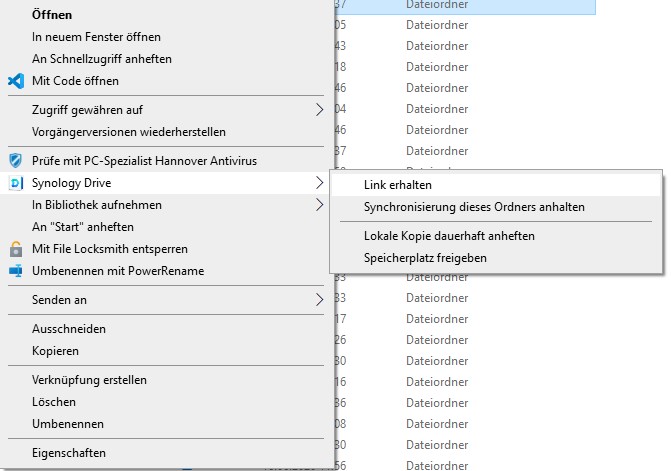
1\. Navigieren Sie zum dem Pfad, der mit Synology Drive synchronisiert wird. Klicken Sie rechts auf die Datei oder den Ordner und wählen Sie **Link erhalten** aus.

[![Synology Drive: interne Freigabe 1](https://wiki.pcspezialist-hannover.de/uploads/images/gallery/2024-06/scaled-1680-/synology-interne-freigabe-1.jpg)](https://wiki.pcspezialist-hannover.de/uploads/images/gallery/2024-06/synology-interne-freigabe-1.jpg)
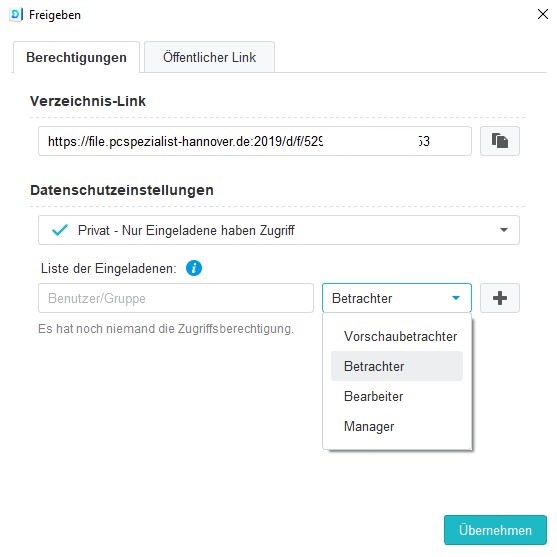
2\. Im Reiter **Berechtigungen** sehen Sie einen Verzeichnis-Link und unter den **Datenschutzeinstellungen** können Sie Benutzer oder Gruppen hinzufügen und einer Gruppe zuweisen. Wenn Sie auf das <span style="color: rgb(236, 240, 241); background-color: rgb(53, 152, 219);">i</span> klicken, sehen Sie die detaillierten Berechtigungen. Bestätigen Sie abschließend mit Klick auf **Übernehmen**.

[![Synology Drive: interne Freigabe 2](https://wiki.pcspezialist-hannover.de/uploads/images/gallery/2024-06/scaled-1680-/synology-interne-freigabe-2.jpg)](https://wiki.pcspezialist-hannover.de/uploads/images/gallery/2024-06/synology-interne-freigabe-2.jpg)
3\. Die Person erhält nun eine Benachrichtigung, erkennbar an dem roten Punkt am Drive Taskleistensymbol. [![Synology Drive - roter Punkt](https://wiki.pcspezialist-hannover.de/uploads/images/gallery/2024-05/scaled-1680-/drive-roterpunkt.jpg)](https://wiki.pcspezialist-hannover.de/uploads/images/gallery/2024-05/drive-roterpunkt.jpg)

[![Synology Drive: interne Freigabe 3](https://wiki.pcspezialist-hannover.de/uploads/images/gallery/2024-06/scaled-1680-/synology-interne-freigabe-3.jpg)](https://wiki.pcspezialist-hannover.de/uploads/images/gallery/2024-06/synology-interne-freigabe-3.jpg)
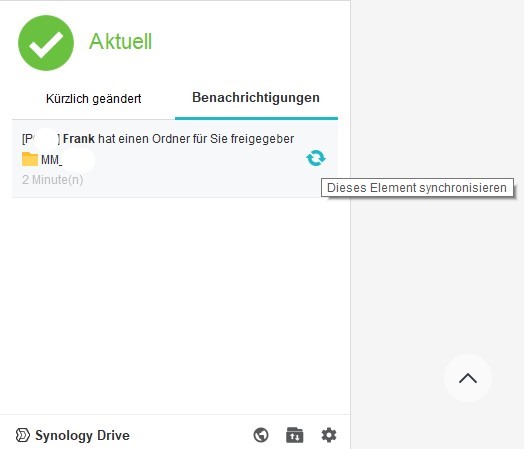
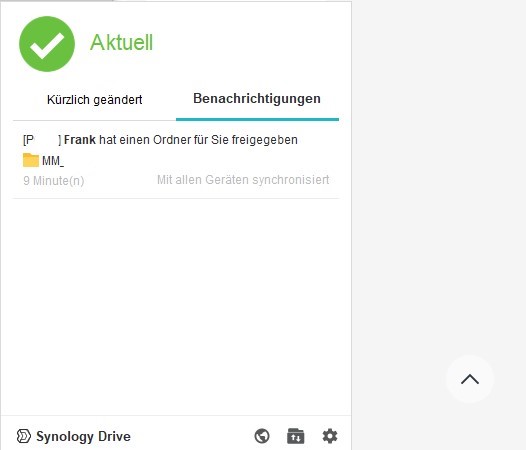
In den Benachrichtigungen steht nun *\[NAS-Name\] Nutzername hat ..... für Sie freigegeben*. Klicken Sie auf die drehenden Pfeile.

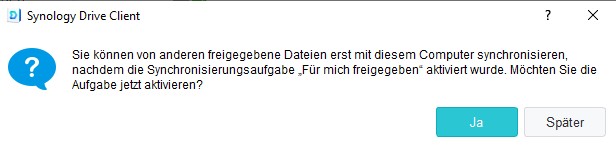
4\. Nur bei der ersten internen Freigabe müssen Sie einmalig die Synchronisierungsaufgabe aktivieren. Klicken Sie dazu auf **Ja** und wählen einen gewünschten Ordnerpfad wie z.B. C:\\Drive\_Teilen.

[![Synology Drive: interne Freigabe 4](https://wiki.pcspezialist-hannover.de/uploads/images/gallery/2024-06/scaled-1680-/synology-interne-freigabe-4.jpg)](https://wiki.pcspezialist-hannover.de/uploads/images/gallery/2024-06/synology-interne-freigabe-4.jpg)
[![Synology Drive: interne Freigabe 5](https://wiki.pcspezialist-hannover.de/uploads/images/gallery/2024-06/scaled-1680-/synology-interne-freigabe-5.jpg)](https://wiki.pcspezialist-hannover.de/uploads/images/gallery/2024-06/synology-interne-freigabe-5.jpg)
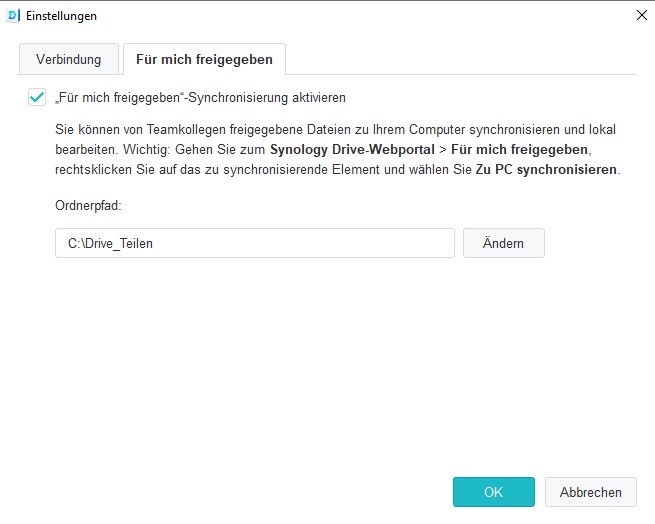
5\. Wenn alles funktioniert hat, sehen Sie nun die Synchroniserungsaufgabe **Für mich freigegeben** mit einem weißen Haken auf grünem Grund.

[![Synology Drive: interne Freigabe 6](https://wiki.pcspezialist-hannover.de/uploads/images/gallery/2024-06/scaled-1680-/synology-interne-freigabe-6.jpg)](https://wiki.pcspezialist-hannover.de/uploads/images/gallery/2024-06/synology-interne-freigabe-6.jpg)
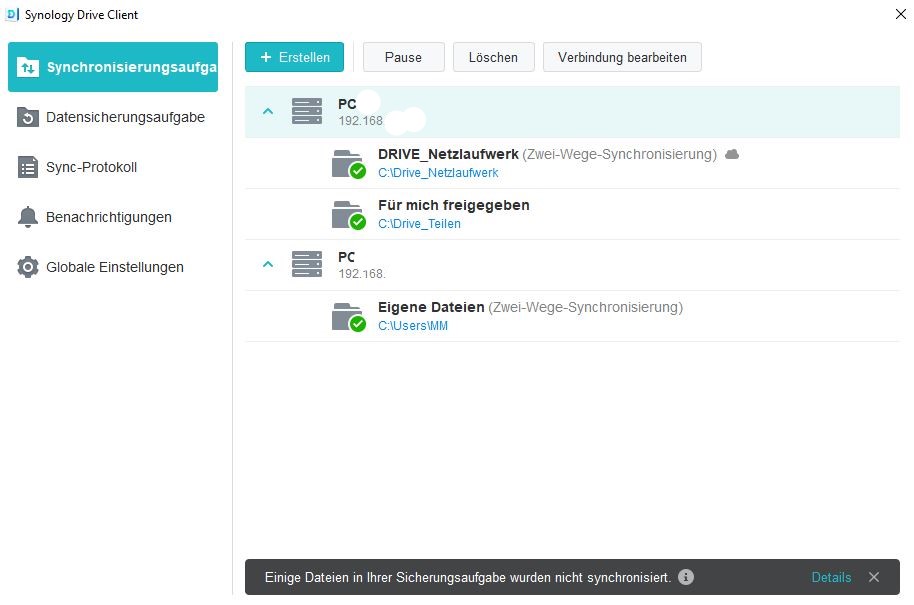
6\. Nun steht unter Benachrichtigungen *Mit allen Geräten synchronisiert* und Sie finden den Ordner auf der Festplatte am in Schritt 4 asugewählten Pfad.

[![Synology Drive: interne Freigabe 8](https://wiki.pcspezialist-hannover.de/uploads/images/gallery/2024-06/scaled-1680-/synology-interne-freigabe-8.jpg)](https://wiki.pcspezialist-hannover.de/uploads/images/gallery/2024-06/synology-interne-freigabe-8.jpg)
# Dateien/Ordner über Synology Drive extern teilen

- Über Synology Drive ist das Teilen von Ordnern mit externen Partner möglich. Öffnen Sie dazu per Rechtsklick das Kontextmenü und gehen Sie zu **Synology Drive &gt; Link** erhalten.
- [![Synology Drive Freigabelink 1](https://wiki.pcspezialist-hannover.de/uploads/images/gallery/2024-05/scaled-1680-/synologydrive-freigabelink-1.jpg)](https://wiki.pcspezialist-hannover.de/uploads/images/gallery/2024-05/synologydrive-freigabelink-1.jpg)
- Nun können Sie im geöffneten Fenster den Tab **Öffentlicher Link** anklicken und dort die Optionen auswählen.
- [![Synology Drive Freigabelink 2](https://wiki.pcspezialist-hannover.de/uploads/images/gallery/2024-05/scaled-1680-/synologydrive-freigabelink-2.jpg)](https://wiki.pcspezialist-hannover.de/uploads/images/gallery/2024-05/synologydrive-freigabelink-2.jpg)
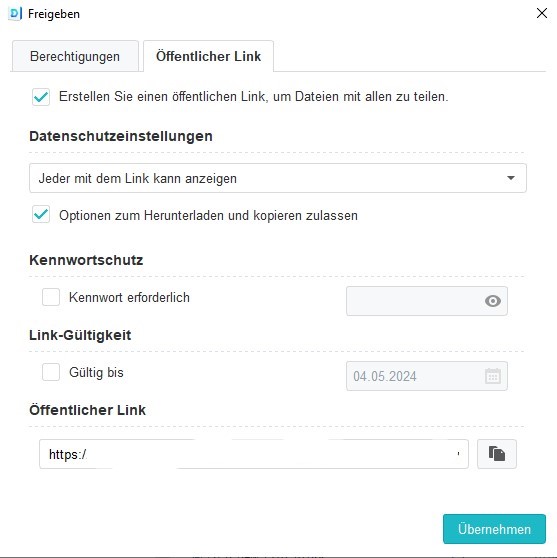
- Bei einer dauerhaften Zusammenarbeit kann man auf eine Gültigkeit verzichten. Je nach Art der Daten bietet sich ein Kennwort an. Bei öffentlichen Dokumenten kann man darauf verzichten.
- Den öffentlichen Link nach dem Muster [https://file.firma.de:9871/d/s/123456789](https://file.firma.de:9871/d/s/123456789) können Sie in die Zwischenablage kopieren und weitergeben (z.B. E-Mail oder Chat).

# Synology DRIVE - Teilen von Dateien nicht möglich

<span style="font-size: 11.0pt; mso-fareast-language: EN-US;">Wenn Ihnen die Funktion aus der dieser Anleitung fehlt, liegt das in der Regel daran, dass Sie es an der falschen Stelle auf Ihrem Laptop versucht haben oder Synology DRIVE nicht gestartet ist.</span>

[<span style="font-size: 11.0pt; mso-fareast-language: EN-US;">Grundlegende Funktion ... | PC-SPEZIALIST Wiki (Protected link to pcspezialist-hannover.de)</span>](https://pcspezialist-hannover-de.cloud.nospamproxy.com/link?id=BAgAAAASAz4zFDFFG8YAAADB5mAkEgNewCVbtt6R1QZxFk0ib7nzMGWbDVFBIgVuaOgAU95EM4jVUac9KXwodp5nHHfXzod9kGRyP-MeUdp16XU13ReS-nXDJIxZXUSOkm6LoY4Bje4NejN-gsYsXBEJxg9vCH1q7cq5QRyCg3tYqda1VakwQL15OJrOpTt6ZgZaXdU7_clCoU1O1gdqT-jS-70IS3Si-KxCka-wTIc8Y64HhiApPCIfeuiD6Z7Y4mBgVJbRPYfqRWGCwJE2nZDHwwWWwvY1)

<span style="font-size: 11.0pt; mso-fareast-language: EN-US;">Bitte prüfen Sie zuerst, ob das Symbol </span>![](https://wiki.pcspezialist-hannover.de/uploads/images/gallery/2025-09/embedded-image-ghlar2aw.png)<span style="font-size: 11.0pt; mso-fareast-language: EN-US;"> rechts unten bei Datum und Uhrzeit angezeigt wird.</span>

<span style="font-size: 11.0pt; mso-fareast-language: EN-US;">Ist dies nicht der Fall, öffnen Sie das Suchfeld von Windows </span>![](https://wiki.pcspezialist-hannover.de/uploads/images/gallery/2025-09/embedded-image-gt7dvltd.png)<span style="font-size: 11.0pt; mso-fareast-language: EN-US;"> geben Synology DRIVE ein und suchen danach. Klicken Sie es an, so dass das Programm gestartet wird.</span>

<span style="font-size: 11.0pt; mso-fareast-language: EN-US;">Ist die Funktion wieder verfügbar?</span>

<span style="font-size: 11.0pt; mso-fareast-language: EN-US;">Denken Sie daran, dass die VPN-Verbindung aktiv sein muss, wenn Sie nicht im Büro sind.</span><span style="font-size: 11.0pt; mso-fareast-language: EN-US;"> </span>

<span style="font-size: 11.0pt; mso-fareast-language: EN-US;">Der zweite mögliche Fall ist der falsche Speicherort auf Ihrem PC.</span>

<span style="font-size: 11.0pt; mso-fareast-language: EN-US;">Öffnen Sie den Windows Explorer </span>![](https://wiki.pcspezialist-hannover.de/uploads/images/gallery/2025-09/embedded-image-rm9djegn.png)

<span style="font-size: 11.0pt; mso-fareast-language: EN-US;">Sehen Sie an der Seite </span>![](https://wiki.pcspezialist-hannover.de/uploads/images/gallery/2025-09/embedded-image-rbtqhddp.png)<span style="font-size: 11.0pt; mso-fareast-language: EN-US;"> ?</span>

<span style="font-size: 11.0pt; mso-fareast-language: EN-US;">Von dort muss die Anleitung umsetzbar sein.</span>

# Synology DRIVE: Daten auf dem Gerät behalten (lokal) und wieder freigeben

####   


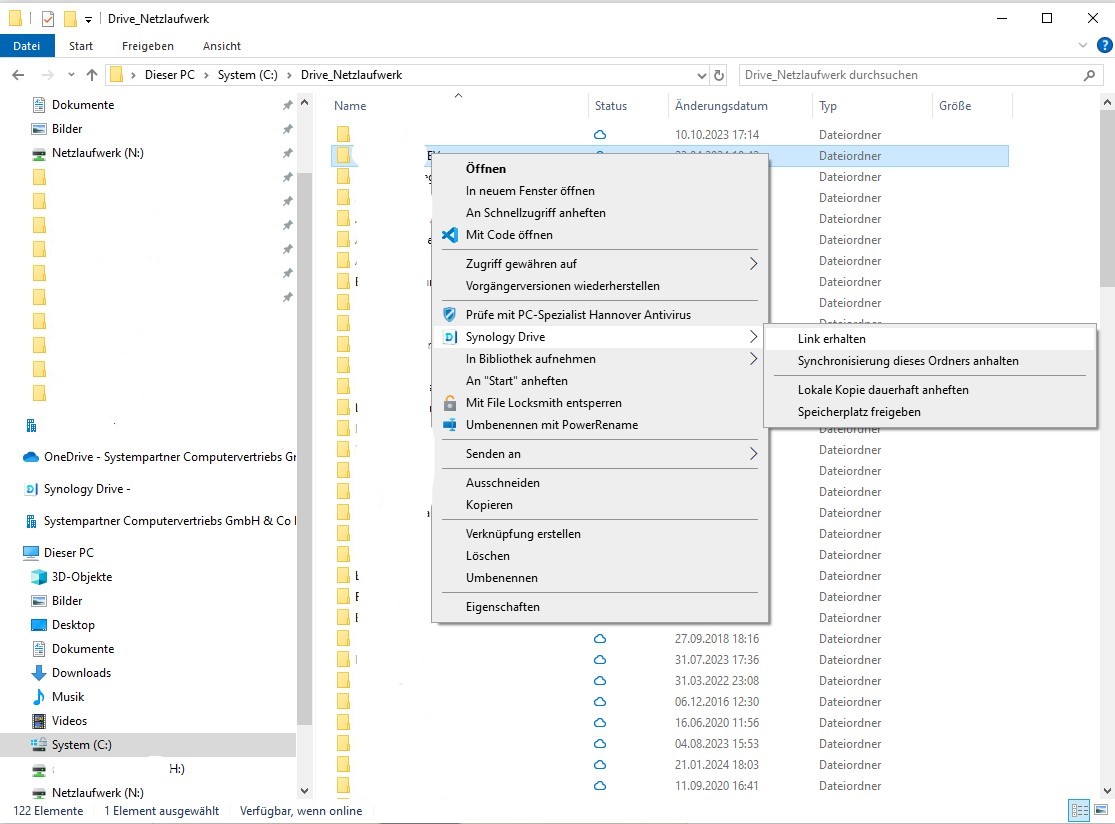
- Klicken Sie auf den Ordner oder die Datei mit der rechten Maustaste. Wenn Sie in einem Ordner mit Synology Drive Synchroniserung sind, sehen Sie die Option Synology Drive im Kontextmenü und können darüber dann **Lokale Kopie dauerhaft anheften** auswählen.

[![Synology Drive Lokale Kopie](https://wiki.pcspezialist-hannover.de/uploads/images/gallery/2024-05/scaled-1680-/synologydrive-lokal-1.jpg)](https://wiki.pcspezialist-hannover.de/uploads/images/gallery/2024-05/synologydrive-lokal-1.jpg)
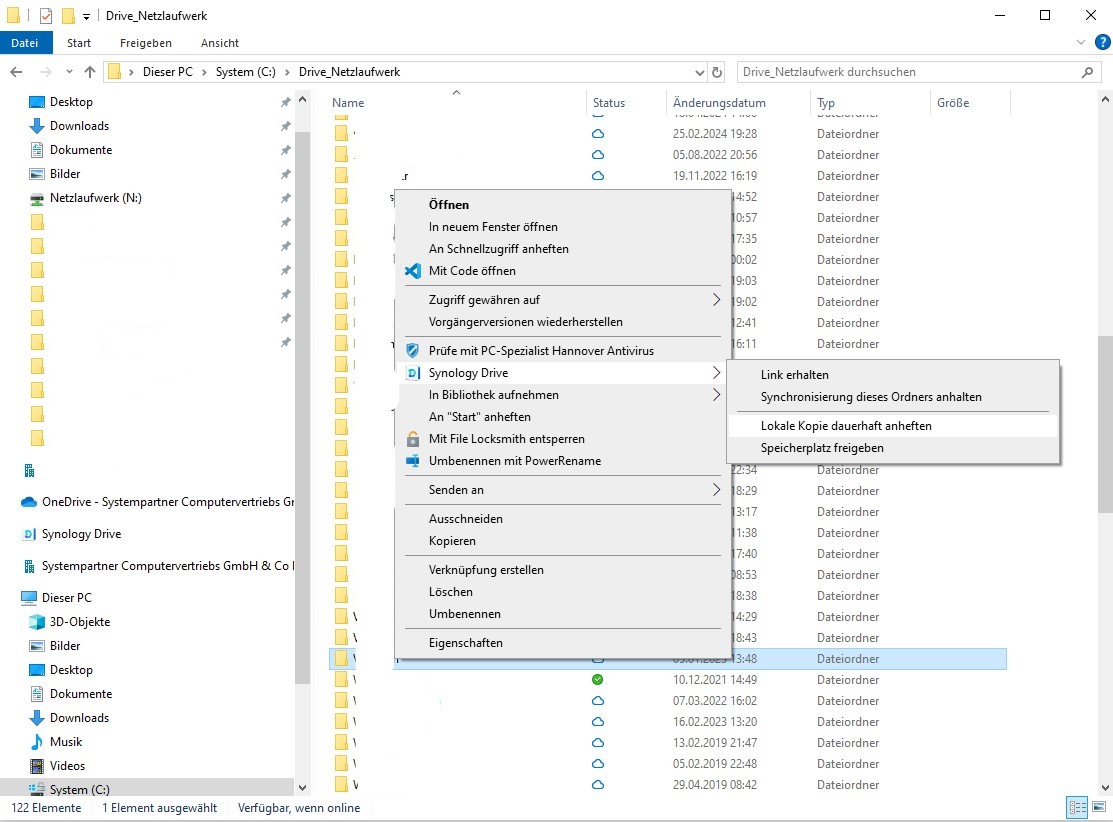
Mit **Speicherplatz freigeben** wird das gGgenteil erreicht und die Datei/der Ordner vom PC entfernt, ohne diesen wirklich zu löschen

# Synology DRIVE: Sync-Jobs Pausieren oder Löschen

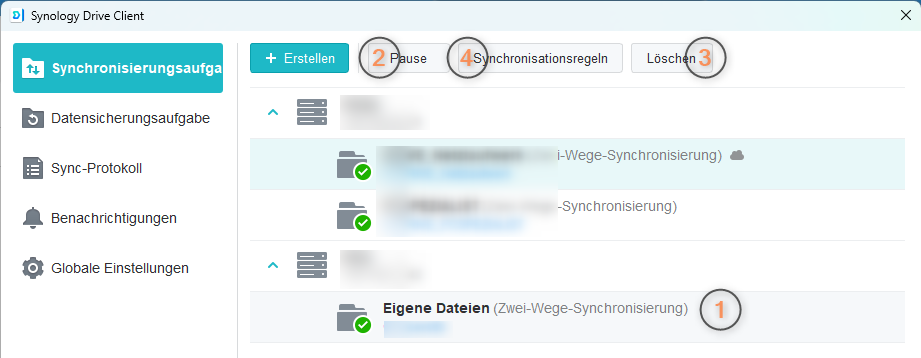
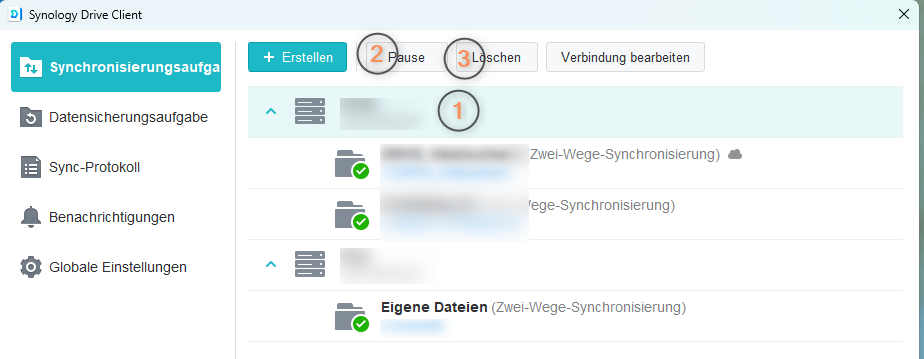
Öffnen Sie **Synology DRIVE** mit einem **Doppelklick** auf das Symbol rechts unten neben Datum/Uhrzeit

**Markieren** Sie den Sync-Job (1) mit einem Linksklick.

Klicken Sie auf **Pause** (2) falls Sie den Job später reaktivieren wollen oder auf **Löschen** (3) wenn Sie den Job <span style="text-decoration: underline;">**dauerhaft** </span>entfernen möchten.

**Beim Löschen werden ALLE Sync-Jobs entfernt**.  
Wollen Sie wirklich nur den persönlichen Sync löschen, markieren Sie nur diesen und wählen Pause (2) oder Löschen (3)

Mit einem Klick auf **Synchronisationsregeln** (4) können Sie **individuell** einstellen, was Sie Synchronisieren wollen

Generell:

[![image.png](https://wiki.pcspezialist-hannover.de/uploads/images/gallery/2026-03/scaled-1680-/DPIimage.png)](https://wiki.pcspezialist-hannover.de/uploads/images/gallery/2026-03/DPIimage.png)
<span style="mso-no-proof: yes;">  
</span>

<span style="mso-no-proof: yes;">Individuell:</span>

[![image.png](https://wiki.pcspezialist-hannover.de/uploads/images/gallery/2026-03/scaled-1680-/Putimage.png)](https://wiki.pcspezialist-hannover.de/uploads/images/gallery/2026-03/Putimage.png)

# Synology Drive – Synchronisierungskonflikte & häufige Fehler

## 1. Dateikonflikte: Ursachen &amp; Prävention

Dateikonflikte entstehen, wenn dieselbe Datei gleichzeitig oder kurz nacheinander an verschiedenen Stellen verändert wird.

<div class="group relative my-[1em]" id="bkmrk-%23-ursache-erkl%C3%A4rung-"><div aria-hidden="true" class="sticky top-0 z-10 h-0"><div class="w-full overflow-hidden bg-raised border-x md:max-w-[90vw] border-subtlest ring-subtlest divide-subtlest">  
</div></div><div class="w-full overflow-auto scrollbar-subtle rounded-lg border md:max-w-[90vw] border-subtlest ring-subtlest divide-subtlest bg-raised"><table class="[&_tr:last-child_td]:border-b-0 my-0 w-full table-auto border-separate border-spacing-0 text-sm font-sans rounded-lg [&_tr:last-child_td:first-child]:rounded-bl-lg [&_tr:last-child_td:last-child]:rounded-br-lg"><thead><tr><th class="border-subtlest p-sm min-w-[48px] break-normal border-b text-left align-bottom border-r last:border-r-0 font-bold bg-subtle first:border-radius-tl-lg last:border-radius-tr-lg" scope="col">\#</th><th class="border-subtlest p-sm min-w-[48px] break-normal border-b text-left align-bottom border-r last:border-r-0 font-bold bg-subtle first:border-radius-tl-lg last:border-radius-tr-lg" scope="col">Ursache</th><th class="border-subtlest p-sm min-w-[48px] break-normal border-b text-left align-bottom border-r last:border-r-0 font-bold bg-subtle first:border-radius-tl-lg last:border-radius-tr-lg" scope="col">Erklärung</th><th class="border-subtlest p-sm min-w-[48px] break-normal border-b text-left align-bottom border-r last:border-r-0 font-bold bg-subtle first:border-radius-tl-lg last:border-radius-tr-lg" scope="col">Präventionsmaßnahme</th></tr></thead><tbody><tr><td class="border-subtlest px-sm min-w-[48px] break-normal border-b border-r last:border-r-0">1</td><td class="border-subtlest px-sm min-w-[48px] break-normal border-b border-r last:border-r-0">**Gleichzeitige Bearbeitung**</td><td class="border-subtlest px-sm min-w-[48px] break-normal border-b border-r last:border-r-0">Zwei oder mehr Nutzer bearbeiten dieselbe Datei zur selben Zeit</td><td class="border-subtlest px-sm min-w-[48px] break-normal border-b border-r last:border-r-0">Synology Office für Echtzeit-Kollaboration nutzen; klassische Dateien nicht gleichzeitig öffnen</td></tr><tr><td class="border-subtlest px-sm min-w-[48px] break-normal border-b border-r last:border-r-0">2</td><td class="border-subtlest px-sm min-w-[48px] break-normal border-b border-r last:border-r-0">**Offline-Änderung**</td><td class="border-subtlest px-sm min-w-[48px] break-normal border-b border-r last:border-r-0">Gerät war offline, Datei wurde lokal geändert, nach Reconnect kollidiert sie mit einer neueren Serverversion</td><td class="border-subtlest px-sm min-w-[48px] break-normal border-b border-r last:border-r-0">Nach Reconnect kurz warten und das Protokoll auf Konflikte prüfen</td></tr><tr><td class="border-subtlest px-sm min-w-[48px] break-normal border-b border-r last:border-r-0">3</td><td class="border-subtlest px-sm min-w-[48px] break-normal border-b border-r last:border-r-0">**Mehrere Geräte eines Nutzers**</td><td class="border-subtlest px-sm min-w-[48px] break-normal border-b border-r last:border-r-0">Gleiche Datei auf mehreren Geräten gleichzeitig offen und bearbeitet</td><td class="border-subtlest px-sm min-w-[48px] break-normal border-b border-r last:border-r-0">Datei jeweils nur auf einem Gerät gleichzeitig öffnen</td></tr><tr><td class="border-subtlest px-sm min-w-[48px] break-normal border-b border-r last:border-r-0">4</td><td class="border-subtlest px-sm min-w-[48px] break-normal border-b border-r last:border-r-0">**Autosave-Anwendungen**</td><td class="border-subtlest px-sm min-w-[48px] break-normal border-b border-r last:border-r-0">Programme wie Word, Excel oder LibreOffice speichern in kurzen Intervallen automatisch – Drive triggert jeden Speichervorgang als Sync-Ereignis</td><td class="border-subtlest px-sm min-w-[48px] break-normal border-b border-r last:border-r-0">Autosave-Intervall verlängern oder betroffene Dateitypen vom Sync ausschließen</td></tr><tr><td class="border-subtlest px-sm min-w-[48px] break-normal border-b border-r last:border-r-0">5</td><td class="border-subtlest px-sm min-w-[48px] break-normal border-b border-r last:border-r-0">**Paralleler Sync-Dienst aktiv**</td><td class="border-subtlest px-sm min-w-[48px] break-normal border-b border-r last:border-r-0">Ein weiterer Cloud-Dienst synchronisiert denselben Ordner gleichzeitig</td><td class="border-subtlest px-sm min-w-[48px] break-normal border-b border-r last:border-r-0">Nie zwei Sync-Dienste auf denselben Ordner zeigen lassen</td></tr></tbody></table>

</div></div>---

## 2. Synchronisierungsfehler: Ursachen &amp; Lösungen

Diese Fehler verhindern oder unterbrechen die Synchronisierung, erzeugen aber keine Konfliktkopien.

## 2.1 Dateiname &amp; Dateipfad

<div class="group relative my-[1em]" id="bkmrk-%23-fehler-ursache-l%C3%B6s"><div aria-hidden="true" class="sticky top-0 z-10 h-0"><div class="w-full overflow-hidden bg-raised border-x md:max-w-[90vw] border-subtlest ring-subtlest divide-subtlest">  
</div></div><div class="w-full overflow-auto scrollbar-subtle rounded-lg border md:max-w-[90vw] border-subtlest ring-subtlest divide-subtlest bg-raised"><table class="[&_tr:last-child_td]:border-b-0 my-0 w-full table-auto border-separate border-spacing-0 text-sm font-sans rounded-lg [&_tr:last-child_td:first-child]:rounded-bl-lg [&_tr:last-child_td:last-child]:rounded-br-lg"><thead><tr><th class="border-subtlest p-sm min-w-[48px] break-normal border-b text-left align-bottom border-r last:border-r-0 font-bold bg-subtle first:border-radius-tl-lg last:border-radius-tr-lg" scope="col">\#</th><th class="border-subtlest p-sm min-w-[48px] break-normal border-b text-left align-bottom border-r last:border-r-0 font-bold bg-subtle first:border-radius-tl-lg last:border-radius-tr-lg" scope="col">Fehler</th><th class="border-subtlest p-sm min-w-[48px] break-normal border-b text-left align-bottom border-r last:border-r-0 font-bold bg-subtle first:border-radius-tl-lg last:border-radius-tr-lg" scope="col">Ursache</th><th class="border-subtlest p-sm min-w-[48px] break-normal border-b text-left align-bottom border-r last:border-r-0 font-bold bg-subtle first:border-radius-tl-lg last:border-radius-tr-lg" scope="col">Lösung</th></tr></thead><tbody><tr><td class="border-subtlest px-sm min-w-[48px] break-normal border-b border-r last:border-r-0">1</td><td class="border-subtlest px-sm min-w-[48px] break-normal border-b border-r last:border-r-0">Ungültiger Dateiname</td><td class="border-subtlest px-sm min-w-[48px] break-normal border-b border-r last:border-r-0">Sonderzeichen oder vom Betriebssystem reservierte Zeichen im Dateinamen</td><td class="border-subtlest px-sm min-w-[48px] break-normal border-b border-r last:border-r-0">Dateinamen bereinigen; einheitliche Benennungskonvention im Team einführen</td></tr><tr><td class="border-subtlest px-sm min-w-[48px] break-normal border-b border-r last:border-r-0">2</td><td class="border-subtlest px-sm min-w-[48px] break-normal border-b border-r last:border-r-0">Probleme mit Umlauten</td><td class="border-subtlest px-sm min-w-[48px] break-normal border-b border-r last:border-r-0">Kompatibilitätsprobleme je nach Betriebssystem und DSM-Version</td><td class="border-subtlest px-sm min-w-[48px] break-normal border-b border-r last:border-r-0">Umlaute in Dateinamen grundsätzlich vermeiden</td></tr><tr><td class="border-subtlest px-sm min-w-[48px] break-normal border-b border-r last:border-r-0">3</td><td class="border-subtlest px-sm min-w-[48px] break-normal border-b border-r last:border-r-0">Pfad zu lang</td><td class="border-subtlest px-sm min-w-[48px] break-normal border-b border-r last:border-r-0">Maximale Pfadlänge des Betriebssystems oder des NAS überschritten</td><td class="border-subtlest px-sm min-w-[48px] break-normal border-b border-r last:border-r-0">Ordnerhierarchien flacher gestalten; lange Dateinamen kürzen</td></tr><tr><td class="border-subtlest px-sm min-w-[48px] break-normal border-b border-r last:border-r-0">4</td><td class="border-subtlest px-sm min-w-[48px] break-normal border-b border-r last:border-r-0">Leerzeichen am Anfang oder Ende</td><td class="border-subtlest px-sm min-w-[48px] break-normal border-b border-r last:border-r-0">Werden von manchen Betriebssystemen unterschiedlich behandelt und führen zu Inkonsistenz</td><td class="border-subtlest px-sm min-w-[48px] break-normal border-b border-r last:border-r-0">Keine führenden oder nachgestellten Leerzeichen in Dateinamen verwenden</td></tr></tbody></table>

</div></div>## 2.2 Zugriff &amp; Berechtigungen

<div class="group relative my-[1em]" id="bkmrk-%23-fehler-ursache-l%C3%B6s-1"><div aria-hidden="true" class="sticky top-0 z-10 h-0"><div class="w-full overflow-hidden bg-raised border-x md:max-w-[90vw] border-subtlest ring-subtlest divide-subtlest">  
</div></div><div class="w-full overflow-auto scrollbar-subtle rounded-lg border md:max-w-[90vw] border-subtlest ring-subtlest divide-subtlest bg-raised"><table class="[&_tr:last-child_td]:border-b-0 my-0 w-full table-auto border-separate border-spacing-0 text-sm font-sans rounded-lg [&_tr:last-child_td:first-child]:rounded-bl-lg [&_tr:last-child_td:last-child]:rounded-br-lg"><thead><tr><th class="border-subtlest p-sm min-w-[48px] break-normal border-b text-left align-bottom border-r last:border-r-0 font-bold bg-subtle first:border-radius-tl-lg last:border-radius-tr-lg" scope="col">\#</th><th class="border-subtlest p-sm min-w-[48px] break-normal border-b text-left align-bottom border-r last:border-r-0 font-bold bg-subtle first:border-radius-tl-lg last:border-radius-tr-lg" scope="col">Fehler</th><th class="border-subtlest p-sm min-w-[48px] break-normal border-b text-left align-bottom border-r last:border-r-0 font-bold bg-subtle first:border-radius-tl-lg last:border-radius-tr-lg" scope="col">Ursache</th><th class="border-subtlest p-sm min-w-[48px] break-normal border-b text-left align-bottom border-r last:border-r-0 font-bold bg-subtle first:border-radius-tl-lg last:border-radius-tr-lg" scope="col">Lösung</th></tr></thead><tbody><tr><td class="border-subtlest px-sm min-w-[48px] break-normal border-b border-r last:border-r-0">5</td><td class="border-subtlest px-sm min-w-[48px] break-normal border-b border-r last:border-r-0">Datei gesperrt / Zugriff verweigert</td><td class="border-subtlest px-sm min-w-[48px] break-normal border-b border-r last:border-r-0">Datei wird von einer anderen Anwendung exklusiv verwendet (z. B. Datenbank, E-Mail-Archive)</td><td class="border-subtlest px-sm min-w-[48px] break-normal border-b border-r last:border-r-0">Anwendung schließen; dauerhaft betroffene Dateitypen vom Sync ausschließen</td></tr><tr><td class="border-subtlest px-sm min-w-[48px] break-normal border-b border-r last:border-r-0">6</td><td class="border-subtlest px-sm min-w-[48px] break-normal border-b border-r last:border-r-0">Fehlende Systemberechtigung (macOS)</td><td class="border-subtlest px-sm min-w-[48px] break-normal border-b border-r last:border-r-0">Drive Client hat keinen ausreichenden Systemzugriff</td><td class="border-subtlest px-sm min-w-[48px] break-normal border-b border-r last:border-r-0">In den Systemeinstellungen den erforderlichen Datenschutz-Zugriff für den Drive Client erteilen</td></tr><tr><td class="border-subtlest px-sm min-w-[48px] break-normal border-b border-r last:border-r-0">7</td><td class="border-subtlest px-sm min-w-[48px] break-normal border-b border-r last:border-r-0">Benutzer ohne Drive-Berechtigung</td><td class="border-subtlest px-sm min-w-[48px] break-normal border-b border-r last:border-r-0">Der DSM-Benutzer hat kein Zugriffsrecht auf den freigegebenen Ordner oder den Drive-Dienst</td><td class="border-subtlest px-sm min-w-[48px] break-normal border-b border-r last:border-r-0">DSM-Benutzerverwaltung prüfen: Ordner-Berechtigungen und Drive-Aktivierung kontrollieren</td></tr></tbody></table>

</div></div>## 2.3 Netzwerk &amp; Verbindung

<div class="group relative my-[1em]" id="bkmrk-%23-fehler-ursache-l%C3%B6s-2"><div aria-hidden="true" class="sticky top-0 z-10 h-0"><div class="w-full overflow-hidden bg-raised border-x md:max-w-[90vw] border-subtlest ring-subtlest divide-subtlest">  
</div></div><div class="w-full overflow-auto scrollbar-subtle rounded-lg border md:max-w-[90vw] border-subtlest ring-subtlest divide-subtlest bg-raised"><table class="[&_tr:last-child_td]:border-b-0 my-0 w-full table-auto border-separate border-spacing-0 text-sm font-sans rounded-lg [&_tr:last-child_td:first-child]:rounded-bl-lg [&_tr:last-child_td:last-child]:rounded-br-lg"><thead><tr><th class="border-subtlest p-sm min-w-[48px] break-normal border-b text-left align-bottom border-r last:border-r-0 font-bold bg-subtle first:border-radius-tl-lg last:border-radius-tr-lg" scope="col">\#</th><th class="border-subtlest p-sm min-w-[48px] break-normal border-b text-left align-bottom border-r last:border-r-0 font-bold bg-subtle first:border-radius-tl-lg last:border-radius-tr-lg" scope="col">Fehler</th><th class="border-subtlest p-sm min-w-[48px] break-normal border-b text-left align-bottom border-r last:border-r-0 font-bold bg-subtle first:border-radius-tl-lg last:border-radius-tr-lg" scope="col">Ursache</th><th class="border-subtlest p-sm min-w-[48px] break-normal border-b text-left align-bottom border-r last:border-r-0 font-bold bg-subtle first:border-radius-tl-lg last:border-radius-tr-lg" scope="col">Lösung</th></tr></thead><tbody><tr><td class="border-subtlest px-sm min-w-[48px] break-normal border-b border-r last:border-r-0">8</td><td class="border-subtlest px-sm min-w-[48px] break-normal border-b border-r last:border-r-0">Client verbindet sich nicht</td><td class="border-subtlest px-sm min-w-[48px] break-normal border-b border-r last:border-r-0">Falsche Verbindungsdaten, Firewall oder geänderte Netzwerkkonfiguration</td><td class="border-subtlest px-sm min-w-[48px] break-normal border-b border-r last:border-r-0">Serveradresse, Zugangsdaten und Netzwerk-/Firewall-Einstellungen prüfen</td></tr><tr><td class="border-subtlest px-sm min-w-[48px] break-normal border-b border-r last:border-r-0">9</td><td class="border-subtlest px-sm min-w-[48px] break-normal border-b border-r last:border-r-0">Synchronisierung bricht regelmäßig ab</td><td class="border-subtlest px-sm min-w-[48px] break-normal border-b border-r last:border-r-0">Instabile Netzwerkverbindung (WLAN, VPN)</td><td class="border-subtlest px-sm min-w-[48px] break-normal border-b border-r last:border-r-0">Auf eine stabilere Verbindung wechseln; VPN-Konfiguration prüfen</td></tr><tr><td class="border-subtlest px-sm min-w-[48px] break-normal border-b border-r last:border-r-0">10</td><td class="border-subtlest px-sm min-w-[48px] break-normal border-b border-r last:border-r-0">NAS extern nicht erreichbar</td><td class="border-subtlest px-sm min-w-[48px] break-normal border-b border-r last:border-r-0">DDNS-Eintrag veraltet oder Netzwerk-Routing nicht korrekt konfiguriert</td><td class="border-subtlest px-sm min-w-[48px] break-normal border-b border-r last:border-r-0">DDNS-Status und Netzwerkkonfiguration prüfen</td></tr></tbody></table>

</div></div>## 2.4 Speicherplatz &amp; Kontingente

<div class="group relative my-[1em]" id="bkmrk-%23-fehler-ursache-l%C3%B6s-3"><div aria-hidden="true" class="sticky top-0 z-10 h-0"><div class="w-full overflow-hidden bg-raised border-x md:max-w-[90vw] border-subtlest ring-subtlest divide-subtlest">  
</div></div><div class="w-full overflow-auto scrollbar-subtle rounded-lg border md:max-w-[90vw] border-subtlest ring-subtlest divide-subtlest bg-raised"><table class="[&_tr:last-child_td]:border-b-0 my-0 w-full table-auto border-separate border-spacing-0 text-sm font-sans rounded-lg [&_tr:last-child_td:first-child]:rounded-bl-lg [&_tr:last-child_td:last-child]:rounded-br-lg"><thead><tr><th class="border-subtlest p-sm min-w-[48px] break-normal border-b text-left align-bottom border-r last:border-r-0 font-bold bg-subtle first:border-radius-tl-lg last:border-radius-tr-lg" scope="col">\#</th><th class="border-subtlest p-sm min-w-[48px] break-normal border-b text-left align-bottom border-r last:border-r-0 font-bold bg-subtle first:border-radius-tl-lg last:border-radius-tr-lg" scope="col">Fehler</th><th class="border-subtlest p-sm min-w-[48px] break-normal border-b text-left align-bottom border-r last:border-r-0 font-bold bg-subtle first:border-radius-tl-lg last:border-radius-tr-lg" scope="col">Ursache</th><th class="border-subtlest p-sm min-w-[48px] break-normal border-b text-left align-bottom border-r last:border-r-0 font-bold bg-subtle first:border-radius-tl-lg last:border-radius-tr-lg" scope="col">Lösung</th></tr></thead><tbody><tr><td class="border-subtlest px-sm min-w-[48px] break-normal border-b border-r last:border-r-0">11</td><td class="border-subtlest px-sm min-w-[48px] break-normal border-b border-r last:border-r-0">Sync stoppt unerwartet</td><td class="border-subtlest px-sm min-w-[48px] break-normal border-b border-r last:border-r-0">NAS-Volume ist voll oder das Benutzerkontingent ist erschöpft</td><td class="border-subtlest px-sm min-w-[48px] break-normal border-b border-r last:border-r-0">Speicherauslastung im DSM prüfen; Kontingente bei Bedarf anpassen</td></tr><tr><td class="border-subtlest px-sm min-w-[48px] break-normal border-b border-r last:border-r-0">12</td><td class="border-subtlest px-sm min-w-[48px] break-normal border-b border-r last:border-r-0">Einzelne Datei wird nicht synchronisiert</td><td class="border-subtlest px-sm min-w-[48px] break-normal border-b border-r last:border-r-0">Datei überschreitet das zulässige Größenlimit</td><td class="border-subtlest px-sm min-w-[48px] break-normal border-b border-r last:border-r-0">Datei komprimieren, aufteilen oder Speicherkonfiguration prüfen</td></tr></tbody></table>

</div></div>## 2.5 Konfiguration &amp; Software

<div class="group relative my-[1em]" id="bkmrk-%23-fehler-ursache-l%C3%B6s-4"><div aria-hidden="true" class="sticky top-0 z-10 h-0"><div class="w-full overflow-hidden bg-raised border-x md:max-w-[90vw] border-subtlest ring-subtlest divide-subtlest">  
</div></div><div class="w-full overflow-auto scrollbar-subtle rounded-lg border md:max-w-[90vw] border-subtlest ring-subtlest divide-subtlest bg-raised"><table class="[&_tr:last-child_td]:border-b-0 my-0 w-full table-auto border-separate border-spacing-0 text-sm font-sans rounded-lg [&_tr:last-child_td:first-child]:rounded-bl-lg [&_tr:last-child_td:last-child]:rounded-br-lg"><thead><tr><th class="border-subtlest p-sm min-w-[48px] break-normal border-b text-left align-bottom border-r last:border-r-0 font-bold bg-subtle first:border-radius-tl-lg last:border-radius-tr-lg" scope="col">\#</th><th class="border-subtlest p-sm min-w-[48px] break-normal border-b text-left align-bottom border-r last:border-r-0 font-bold bg-subtle first:border-radius-tl-lg last:border-radius-tr-lg" scope="col">Fehler</th><th class="border-subtlest p-sm min-w-[48px] break-normal border-b text-left align-bottom border-r last:border-r-0 font-bold bg-subtle first:border-radius-tl-lg last:border-radius-tr-lg" scope="col">Ursache</th><th class="border-subtlest p-sm min-w-[48px] break-normal border-b text-left align-bottom border-r last:border-r-0 font-bold bg-subtle first:border-radius-tl-lg last:border-radius-tr-lg" scope="col">Lösung</th></tr></thead><tbody><tr><td class="border-subtlest px-sm min-w-[48px] break-normal border-b border-r last:border-r-0">13</td><td class="border-subtlest px-sm min-w-[48px] break-normal border-b border-r last:border-r-0">Fehler beim Erstellen einer Synchronisierungsaufgabe</td><td class="border-subtlest px-sm min-w-[48px] break-normal border-b border-r last:border-r-0">Bestehende Aufgabe verweist auf einen nicht mehr vorhandenen Ordner</td><td class="border-subtlest px-sm min-w-[48px] break-normal border-b border-r last:border-r-0">Aufgabe löschen und mit korrektem Zielpfad neu anlegen</td></tr><tr><td class="border-subtlest px-sm min-w-[48px] break-normal border-b border-r last:border-r-0">14</td><td class="border-subtlest px-sm min-w-[48px] break-normal border-b border-r last:border-r-0">Drive Client synchronisiert nach Update nicht mehr</td><td class="border-subtlest px-sm min-w-[48px] break-normal border-b border-r last:border-r-0">Versions-Inkompatibilität zwischen Client und Drive-Server-Paket</td><td class="border-subtlest px-sm min-w-[48px] break-normal border-b border-r last:border-r-0">DSM, Drive Server-Paket und Drive Client auf die aktuellste Version bringen</td></tr><tr><td class="border-subtlest px-sm min-w-[48px] break-normal border-b border-r last:border-r-0">15</td><td class="border-subtlest px-sm min-w-[48px] break-normal border-b border-r last:border-r-0">Endlosschleife / dauerhaftes Synchronisieren</td><td class="border-subtlest px-sm min-w-[48px] break-normal border-b border-r last:border-r-0">Anwendung oder Hintergrundprozess verändert Dateien kontinuierlich</td><td class="border-subtlest px-sm min-w-[48px] break-normal border-b border-r last:border-r-0">Betroffene Dateien oder Ordner vom Sync ausschließen</td></tr></tbody></table>

</div></div>---

## 3. Präventions-Checkliste (bei Neueinrichtung)

- Dateinamenskonvention definieren (keine Sonderzeichen, keine Umlaute, Pfadlänge im Blick behalten)
- Pro Benutzer nur einen aktiven Sync-Client je Ordner
- Keine parallelen Sync-Dienste auf denselben Ordner
- Benutzer-Kontingente regelmäßig prüfen
- Systemberechtigungen des Drive Clients nach Betriebssystem-Updates erneut prüfen
- Synology Drive Server-Paket und DSM stets aktuell halten
- Temporäre Dateien und Anwendungsdatenbanken vom Sync ausschließen
- Konfliktprotokoll regelmäßig kontrollieren

---

## 4. Konflikte erkennen &amp; beheben

1. **Drive Client (Windows/macOS):** Tray-Icon → Aktivitätsprotokoll → Filter „Konflikt" oder „Fehler"
2. **Synology Drive Web-UI:** Betroffenen Ordner nach Dateien mit Konfliktzusatz im Dateinamen durchsuchen (Muster: `Dateiname (Konflikt – Gerätename – Datum).Endung`)
3. **DSM Protokollcenter:** Systemsteuerung → Protokollcenter → Anwendungen → Synology Drive

# Synology Calender

Synology Calender ist Ihr privater Kalender, der auf dem Protokoll CalDAV basiert

# Synchronisierungsfehler bei Nutzung vom Outlook CalDavSynchronizer

Kalendersyncfehler entstehen in der Regel dann, wenn Outlook den [CalDavSynchronizer](https://caldavsynchronizer.org/) deaktiviert.

Dieses Programm ist ein Outlook AddIn, mit dem Outlook das CalDAV-Protokoll nutzen kann.

  
Es muss in Outlook in der obersten Leiste angezeigt werden:

[![Outlook CalDavSynchronizer AddIn läuft](https://wiki.pcspezialist-hannover.de/uploads/images/gallery/2024-05/scaled-1680-/bild2.png)](https://wiki.pcspezialist-hannover.de/uploads/images/gallery/2024-05/bild2.png)

Fehlt es da, muss es aktiviert werden:

Datei -&gt; Optionen -&gt; Add-Ins -&gt; deaktivierte Anwendungen: CalDavSynchronizer und wieder aktivieren

[![Outlook CalDavSynchronizer AddIn aktivieren](https://wiki.pcspezialist-hannover.de/uploads/images/gallery/2024-05/scaled-1680-/bild1.jpg)](https://wiki.pcspezialist-hannover.de/uploads/images/gallery/2024-05/bild1.jpg)
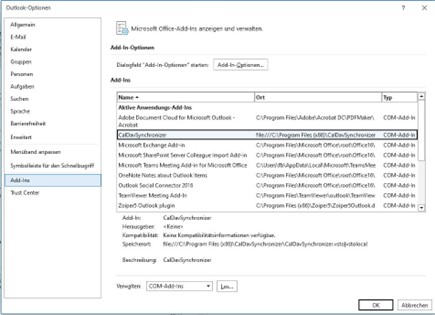
Leider ist es uns nicht möglich aus der Ferne zu erkennen, ob bzw. beim wem das Add-In deaktiviert ist.

# Synology Contacts

# Synology Photos

# Sicherungsquelle für Synology Photos App auswählen (z.B. WhatsApp)

- Öffnen Sie die Einstellungen in Synology Photos
- Klicken Sie nun auf Foto-Sicherung
- Dort navigieren Sie wieder zu den Einstellungen
- Dort können Sie unter Sicherungsquelle nun gewünschte Ordner auswählen

# Synology Hybrid RAID (SHR) und wie Festplatten genutzt werden

## Was ist SHR?

Synology Hybrid RAID (SHR) ist ein automatisiertes RAID-Management-System, das speziell für das Mischen unterschiedlich großer Festplatten entwickelt wurde. Im Gegensatz zu klassischem RAID teilt SHR die Kapazität jeder Platte in kleinere Blöcke auf und baut daraus intern **mehrere RAID-Schichten**, die dann zu einem gemeinsamen Volume zusammengefasst werden. SHR-1 (eine Platte Redundanz) verhält sich dabei je nach Anzahl der Laufwerke wie RAID-1 (2 Platten) oder RAID-5 (3+ Platten).<span class="group/trigger inline-flex min-w-0"><span class="citation inline"><span class="relative -mt-px max-w-full min-w-0 whitespace-nowrap -top-px font-sans text-base text-foreground select-none selection:bg-super/50 selection:text-foreground dark:selection:bg-super/10 dark:selection:text-super"><span class="text-3xs rounded-badge group min-w-4 max-w-full cursor-pointer text-center align-middle font-mono tabular-nums font-normal transition-colors duration-150 inline-flex items-center py-[0.1875rem] leading-snug px-[0.3rem] [@media(hover:hover)]:hover:bg-subtle group-data-[state=open]/trigger:bg-subtle border-subtlest ring-subtlest divide-subtlest bg-quiet"><span class="inline-block relative !mt-0 ![vertical-align:unset] max-w-[25ch] overflow-hidden">synology</span><span class="inline-block ml-xs mr-px !mt-0 ![vertical-align:unset]"><span class="opacity-50">+1</span></span></span></span></span></span>

## Wie SHR Plattengrößen aufteilt

Das Kernprinzip: SHR sucht immer nach **gleich großen Segmenten** über mehrere Platten, um daraus eine RAID-Schicht zu bilden. Was übrig bleibt – der sogenannte „Tail" – wird auf der nächsten Schicht weiterverwendet, sobald eine passende Partnerfestplatte vorhanden ist.<span class="inline-flex"><span class="citation inline">[<span class="relative -mt-px max-w-full min-w-0 whitespace-nowrap -top-px font-sans text-base text-foreground select-none selection:bg-super/50 selection:text-foreground dark:selection:bg-super/10 dark:selection:text-super"><span class="text-3xs rounded-badge group min-w-4 max-w-full cursor-pointer text-center align-middle font-mono tabular-nums font-normal transition-colors duration-150 inline-flex items-center py-[0.1875rem] leading-snug px-[0.3rem] [@media(hover:hover)]:hover:bg-subtle group-data-[state=open]/trigger:bg-subtle border-subtlest ring-subtlest divide-subtlest bg-quiet"><span class="inline-block relative !mt-0 ![vertical-align:unset] max-w-[25ch] overflow-hidden">reddit</span></span></span>](https://www.reddit.com/r/synology/comments/15nnc4a/in_shr_with_four_drives_can_someone_explain_to_me/)</span></span>

Konkret bei 2x 4 TB + 1x 8 TB in SHR-1:

- Schicht 1: 3× 4-TB-Segment → RAID-5 → **8 TB nutzbar**
- Tail auf der 8-TB-Platte: 4 TB → liegt **ungenutzt brach**, weil kein Partner vorhanden ist

## Warum die 3. HDD größer sein sollte

Hier kommt der entscheidende Punkt, den du richtig erkannt hast:

<div class="group relative my-[1em]" id="bkmrk-konfiguration-3.-hdd"><div class="sticky top-0 z-10 h-0"><div class="w-full overflow-hidden bg-raised border-x md:max-w-[90vw] border-subtlest ring-subtlest divide-subtlest">  
</div></div><div class="w-full overflow-auto scrollbar-subtle rounded-lg border md:max-w-[90vw] border-subtlest ring-subtlest divide-subtlest bg-raised"><table class="[&_tr:last-child_td]:border-b-0 my-0 w-full table-auto border-separate border-spacing-0 text-sm font-sans rounded-lg [&_tr:last-child_td:first-child]:rounded-bl-lg [&_tr:last-child_td:last-child]:rounded-br-lg"><thead><tr><th class="border-subtlest p-sm min-w-[48px] break-normal border-b text-left align-bottom border-r last:border-r-0 font-bold bg-subtle first:border-radius-tl-lg last:border-radius-tr-lg" scope="col">Konfiguration</th><th class="border-subtlest p-sm min-w-[48px] break-normal border-b text-left align-bottom border-r last:border-r-0 font-bold bg-subtle first:border-radius-tl-lg last:border-radius-tr-lg" scope="col">3. HDD</th><th class="border-subtlest p-sm min-w-[48px] break-normal border-b text-left align-bottom border-r last:border-r-0 font-bold bg-subtle first:border-radius-tl-lg last:border-radius-tr-lg" scope="col">4. HDD</th><th class="border-subtlest p-sm min-w-[48px] break-normal border-b text-left align-bottom border-r last:border-r-0 font-bold bg-subtle first:border-radius-tl-lg last:border-radius-tr-lg" scope="col">Nutzbarer Speicher</th></tr></thead><tbody><tr><td class="border-subtlest px-sm min-w-[48px] break-normal border-b border-r last:border-r-0">Alle gleich</td><td class="border-subtlest px-sm min-w-[48px] break-normal border-b border-r last:border-r-0">4 TB</td><td class="border-subtlest px-sm min-w-[48px] break-normal border-b border-r last:border-r-0">4 TB</td><td class="border-subtlest px-sm min-w-[48px] break-normal border-b border-r last:border-r-0">**12 TB**</td></tr><tr><td class="border-subtlest px-sm min-w-[48px] break-normal border-b border-r last:border-r-0">3. + 4. größer</td><td class="border-subtlest px-sm min-w-[48px] break-normal border-b border-r last:border-r-0">8 TB</td><td class="border-subtlest px-sm min-w-[48px] break-normal border-b border-r last:border-r-0">8 TB</td><td class="border-subtlest px-sm min-w-[48px] break-normal border-b border-r last:border-r-0">**16 TB**</td></tr><tr><td class="border-subtlest px-sm min-w-[48px] break-normal border-b border-r last:border-r-0">3. größer, 4. klein</td><td class="border-subtlest px-sm min-w-[48px] break-normal border-b border-r last:border-r-0">8 TB</td><td class="border-subtlest px-sm min-w-[48px] break-normal border-b border-r last:border-r-0">4 TB</td><td class="border-subtlest px-sm min-w-[48px] break-normal border-b border-r last:border-r-0">12 TB</td></tr></tbody></table>

</div><div class="sticky z-10 h-0"></div></div>Wenn du die **3. Platte bereits größer (z. B. 8 TB)** wählst und dann die **4. Platte ebenfalls 8 TB** (oder größer), passiert Folgendes:<span class="group/trigger inline-flex min-w-0"><span class="citation inline"><span class="relative -mt-px max-w-full min-w-0 whitespace-nowrap -top-px font-sans text-base text-foreground select-none selection:bg-super/50 selection:text-foreground dark:selection:bg-super/10 dark:selection:text-super"><span class="text-3xs rounded-badge group min-w-4 max-w-full cursor-pointer text-center align-middle font-mono tabular-nums font-normal transition-colors duration-150 inline-flex items-center py-[0.1875rem] leading-snug px-[0.3rem] [@media(hover:hover)]:hover:bg-subtle group-data-[state=open]/trigger:bg-subtle border-subtlest ring-subtlest divide-subtlest bg-quiet"><span class="inline-block relative !mt-0 ![vertical-align:unset] max-w-[25ch] overflow-hidden">box</span><span class="inline-block ml-xs mr-px !mt-0 ![vertical-align:unset]"><span class="opacity-50">+1</span></span></span></span></span></span>

- Schicht 1: 4× 4-TB-Segmente (je 4 TB von jeder Platte) → RAID-5 → **12 TB nutzbar**
- Schicht 2: Die **zwei 4-TB-Tails** der 3. und 4. Platte bilden jetzt ein RAID-1-Paar → **+4 TB nutzbar**
- **Gesamtergebnis: 16 TB nutzbar** statt 12 TB